By
Justin Wong
—
Jenni AI vs Paperpal: Which Edits, Cites and Checks a Paper Better?

Justin Wong
Head of Growth
Graduated with a Bachelor's in Global Business & Digital Arts, Minor in Entrepreneurship

Jenni and Paperpal were given the same 201-word paragraph and the same four jobs: fix a clunky sentence, cite a claim, check the argument, get the file out.
Jenni is a research workspace that writes, cites, reviews and exports a paper in one place. Paperpal is a checker from Cactus Communications, the company behind Editage, and it runs in its own web editor and as an add-in inside Word.
Jenni won three of the four jobs on the quality of what came back. Paperpal flagged more on first open, and it is the tool to use when a manuscript has to stay in Word.
Every count and quote below was read off the screen as the test ran.
<CTA title="Write the paper where the sources live" description="Cite at the cursor, review the argument and export to Word with the citations still linked" buttonLabel="Try Jenni Free" link="https://app.jenni.ai/register" />
TLDR: Jenni or Paperpal?
Jenni for the paper still being written: it fixed the sentence with a diff, cited the trial with its reference in one click, fetched sources for two more claims and exported with the citations live. Paperpal if the manuscript lives in Word: it flagged 11 issues the moment the paragraph landed, and its add-in brings the checks to the file.
Jenni | Paperpal | |
|---|---|---|
Verdict | Writes, cites, reviews and exports the paper in one editor | Checks a finished manuscript, inside Word if that is where it lives |
The sentence | A tighter rewrite in three seconds, with the reason shown before the change | 11 flags on open, including the hedge; a wordier rewrite as tracked changes |
The citation | Citation and APA reference in one click, restyled from a dropdown | Found the trial first by title; citation and reference inserted from a modal |
The argument | Three sources fetched in 21 seconds; one filed, two refused with one click each | Two findings that describe the gaps; no source fetched |
The file | Word with live citation fields, or LaTeX with a .bib file | Word or PDF, plus add-ins for Word, Google Docs and Overleaf |
Price | Plus $30 a month or $144 a year; Pro $73 or $348 | Prime $25 a month or $144 a year; Pro $59 or $348 |
How this was tested
One paragraph, written for the test, pasted into both tools cold:
The paragraph - 201 words on lipid nanoparticles as a CRISPR delivery vehicle, six sentences long.
The two faults - a sentence opening "There is a lot of things that still needs", and a hedge stacked three deep, "could perhaps maybe".
The checkable claim - a mean 87 percent drop in serum transthyretin at the higher dose, which is Gillmore et al., NEJM 2021.
Same conditions - nothing uploaded, the four jobs in the same order in each tool, both in Chrome. Each Paperpal feature was run against the Jenni feature that does the same work.
Where it stops - at the export dialog. Nothing was downloaded from either tool.
Job by job
The sentence
Jenni - highlighting the sentence, which Jenni counts at 43 words, opens a menu: Find citations, AI Chat, AI Edit, Comment, Review. AI Edit holds the named commands, and Improve fluency offers Fix Flow Issues, Add Transitions and Remove Redundancy.
Fix Flow Issues came back in three seconds:
"However, much remains to be worked out, including how these particles behave outside the liver, whether repeated dosing triggers an immune response, and what long-term editing outcomes occur at off-target sites."
See edits shows the change as strikethrough and insertion, and the What changed and why line reads: "Replaced 'There is a lot of things that still needs to be worked out' with 'much remains to be worked out' and improved the parallel structure of the remaining clauses." Replace Selection put the sentence in the document.

Fix Flow Issues in Jenni, three seconds in: the diff and the one-line reason are on screen before anything in the document changes.
Proofread, run over the whole paragraph afterwards, returned six suggestions, four of them punctuation, including a Formatting card asking for "87 percent" to become a numeral with the symbol.
Paperpal - the Edit panel scanned the paragraph the moment it landed and reported 11 suggestions in five sentences, each tagged: Rephrase, Conciseness, Conventions, Subject-Verb Agreement, Redundancy. The broken sentence collected three tags, and the triple hedge got a Redundancy flag of its own.
Its rewrite arrived as tracked changes inside the card:
"However, there are still many aspects that need to be worked out, such as how the particles behave outside the liver, whether repeat dosing causes an immune response, and what the long-term editing outcomes look like at off-target sites."
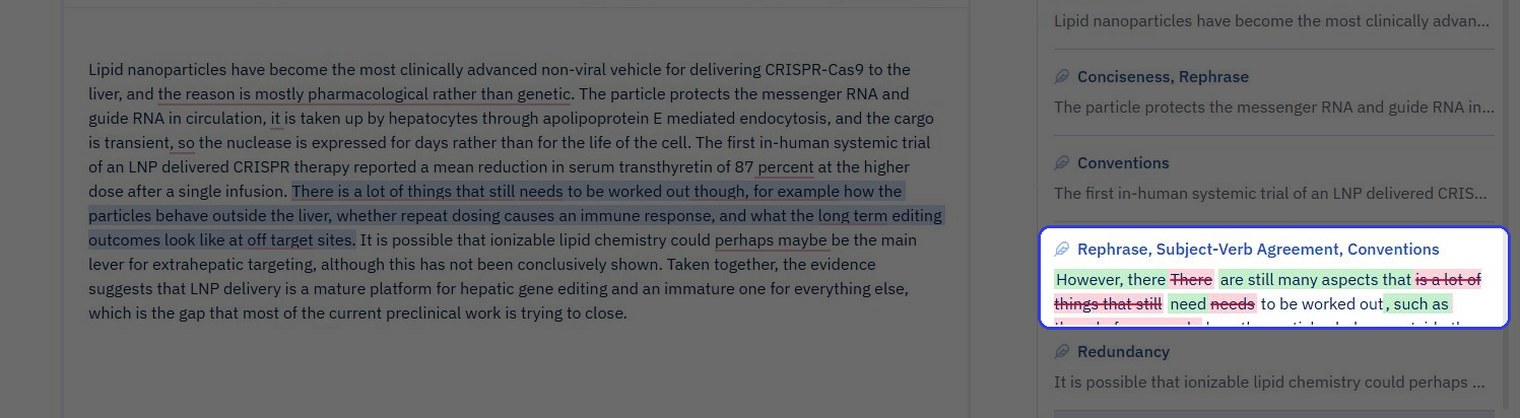
Paperpal on first open: the tagged suggestion list on the right, with the rewrite of the broken sentence shown as tracked changes inside its card.
The rewrite fixes the agreement error and hyphenates both compound modifiers. It keeps "there are still many aspects that need to be worked out", which is the same shape as the original.
Winner - Jenni, on the sentence a supervisor would accept. "Much remains to be worked out" is the tighter fix, and Jenni showed its reasoning before changing anything.
<ProTip title="⚠️ Caution:" description="A rewrite that keeps the shape of the original sentence keeps its problem. Read the suggested sentence aloud before accepting it, whichever tool proposed it" />
The citation
Jenni - the Cite button, or typing @ in the text, opens a search panel at the cursor with three tabs: All, Discover and Library. With the title typed in, Discover listed the NEJM trial first: 1.6K citations, an impact factor of 24.39, an Open Access badge, and an excerpt from the abstract.
Cite on that card did two things in one click. The in-text citation went in at the cursor, and a References section appeared at the foot of the document: the full APA 7th entry with its DOI, a style dropdown and a Sources counter reading 1.

One click after Cite in Jenni: the in-text citation is in the paragraph and the APA 7th reference, with its DOI, is at the foot of the page with a style dropdown beside it.
Paperpal - two routes. Cite Text, opened with the sentence highlighted, returned three broad reviews, two from 2025 and one from 2019, and none of them the trial.
Search Papers with the title typed in found it first time: Gillmore et al., NEJM, August 2021, 1,650 citations, a Q1 badge for a top-quartile journal, open access, with an NEJM letter of the same title second.
Insert Citation opened a modal showing the full APA 7th entry, then dropped the citation at the cursor and added the reference at the bottom of the page.

Paperpal Insert Citation: the APA 7th entry in a modal, the citation label, and the note that the reference goes to the page bottom.
Both tools put the citation after the full stop, where APA wants it before. Neither moved it.
Winner - Jenni, on what the reference is worth once it is in: a References section that restyles from a dropdown and travels into Word as live citation fields.
<ProTip title="📌 Remember:" description="When you know the paper, search its title or DOI rather than the sentence. Cite Text on a highlighted sentence returned three broad reviews; the title search returned the trial first time" />
The argument
Jenni - Review on the top bar lists five: Claim confidence, Peer Review, Source Quality, Tone of Voice and Proofread. Claim confidence is the one this paragraph needed.
It ran for 21 seconds, showed the four database queries it made on the way, and returned three suggestions: two Unsupported, one Weakly supported, with green ticks against Misrepresented, Contradicted, Overstated and Unverifiable. Each suggestion is pinned to a sentence and carries a proposed source with its citation count and impact factor.

The three proposed citations sitting inline in the paragraph in Jenni, with the Claim confidence breakdown in the panel on the right.
How the three went:
The apolipoprotein E claim - Woitok et al., 2020, Cell Death and Disease, 49 citations, impact factor 8.02, a hepatocyte-directed siRNA study. Accepted, and the reference list grew to two.
The "most clinically advanced" line - a 2024 paper in Small on mulberry-leaf lipid nanoparticles for colon disease, 29 citations. A real record, and the wrong one for that sentence. Rejected.
The 87 percent figure - a proposed swap of the NEJM citation for a 2022 reprint of the same study, 46 citations, impact factor 0.00. Same paper, worse record. Rejected.
Every card has Accept and Reject, plus Accept All, Reject All and the Y and N keys, and the panel closes on "All suggestions resolved". Two of the three proposals were refused, one click each, and the one that held up was filed.
Paperpal - the Checks tab holds Reference Checker, Journal Fit and AI Review. AI Review, run as "Check the Scientific Soundness of the Document", came back with numbered findings. The first said no sentence states what the piece contributes. The second quoted the open-questions sentence and noted that the questions are listed, never framed as gaps this work addresses.
Both are fair readings of a paragraph written to stand alone. AI Review describes each problem and suggests a fix in prose; it does not go and find a paper, and the panel labels the feature experimental.
Winner - Jenni, on the criterion of a source for a weak claim. Claim confidence fetched three real records with their citation counts and impact factors, and the writer kept one and refused two in three clicks. AI Review named the gaps and stopped there.
<ProTip title="💡 Pro Tip:" description="Read the journal line on any source a review proposes. A reprint, a yearbook entry or a letter can carry the same title as the paper you actually mean" />
The file
Jenni - the three-dot menu has Export, with two formats: Word (.docx) and LaTeX (.tex). The Word dialog asks the useful question first: native Word citations, which keep the in-text cites and the bibliography linked through the References tab, or hyperlink citations for Google Docs.
Then a layout preset: default, double-spaced manuscript at 12pt Times New Roman with one-inch margins, two-column paper, or thesis with a title page and contents. The LaTeX route packs a .bib file with the .tex. Jenni does not export PDF; Word does that in one Save As.
Paperpal - the pricing page lists export as docx and pdf. The web editor is one of several places it runs: there is a Word add-in, a Chrome extension for Google Docs and Overleaf, and an Edge version. If the manuscript already lives in Word, the checker comes to it.
Winner - depends on where the file lives. Jenni if the citations have to arrive in Word as live fields, or the paper is heading to LaTeX with its .bib file. Paperpal if the manuscript must stay in Word or needs a PDF from the tool itself.
<ProTip title="🔗 Next step:" description="If the manuscript must stay in Word, install the Paperpal add-in rather than pasting into the web editor. The checks run on the file itself and nothing has to be exported back" />
Where Jenni is ahead

Three things Jenni did in the test that Paperpal did not:
Citation and reference in one click, inside the document - the in-text cite and the APA 7th entry with its DOI arrived together, in a References section with a style dropdown. Paperpal inserts the citation and places the reference at the page bottom as text.
A review that fetches sources and files them - three claims flagged, a real paper proposed for each with its citation count and impact factor, the decision left to the writer, and the accepted source added to the list. AI Review describes the gap.
Export that keeps the citations alive - Word with native citation fields linked through the References tab, or LaTeX with a .bib file, across four layout presets including a thesis layout.
What Paperpal has that Jenni does not
Three things, checked against both products, each with what Jenni does instead:
A Word add-in, and extensions for Google Docs and Overleaf - the file never moves. Jenni is one workspace by design: import the .docx, write, cite and review in it, and export the .docx with the citation fields intact. A Jenni Word extension is on a waitlist.
Journal Fit - 30-plus pre-submission checks across six areas: language, references, structure and counts, figures and tables, disclosures, metadata. Jenni has no journal-specific check; its five Reviews cover the claims, the sources, the tone and the proofreading.
A PDF straight from the tool - Jenni sends out Word and LaTeX, and Word saves to PDF in one step.
What each tool costs
The figures are the standard prices on each pricing page, the monthly price and the yearly total.
Plan | Jenni | Paperpal |
|---|---|---|
Free | $0. Unlimited citations, 10 autocompletes a day, 3 AI edits, 5 AI chat messages, 3 reviews, 10 PDF uploads | $0. 200 grammar edits a month, 5 research lookups a day, 5 AI Review uses a day, chat with 5 PDFs a month, no automated bibliography |
Middle tier | Plus: $30 a month, or $144 a year | Prime: $25 a month, or $144 a year |
Top tier | Pro: $73 a month, or $348 a year | Pro: $59 a month, or $348 a year |
What the top tier unlocks | Unlimited autocomplete, chat, edits and reviews, 1,000-page PDFs, full document export, priority support | Unlimited grammar and consistency edits, Journal Fit with a full report, 30k words a month of reference checks, unlimited paraphrase and research, chat with 500 PDFs a month, 10 GB library |
September 2026 pricing, from jenni.ai/pricing and paperpal.com/pricing.
Yearly, the two match: $144 for the middle tier and $348 for the top one on both sites. Monthly, Jenni is $30 and $73 against Paperpal at $25 and $59. Jenni's tiers buy writing volume: autocompletes, edits, reviews, PDF size, export. Paperpal's buy checking volume: edits, reference checks, journal fit reports.
<ProTip title="⏳ Timing:" description="Run Journal Fit last, after the references are final. It runs 30-plus submission checks on the manuscript, references included, so anything you change afterwards has to be checked again" />
Which one should you use?
If there is writing left to do, Jenni. Paperpal is the pass to run inside Word once the manuscript is finished.
If the alternative on the table is a chat assistant rather than a checker, the same paragraph has been through Jenni vs ChatGPT and Jenni vs Claude. Three readers here, one pick each.
The PhD student, chapter three of five
Jenni - the three things you do most while writing a thesis all happen inside the document: the citation search at the cursor, the reference list that builds itself, and Claim confidence run once a chapter. If the papers are in a Zotero or Mendeley library, they import.
Run Paperpal Journal Fit on the finished manuscript if a journal is the destination.
The postdoc with a manuscript due at a journal
Jenni for the manuscript, Paperpal for the journal check - the Word export with native citation fields and the double-spaced preset are the submission jobs. If a reviewer is likely to ask who says so about a paragraph, run it through Claim confidence first. Then Journal Fit, inside Word, on the final file.
The Masters student whose supervisor asks "says who?"
Jenni - a dissertation is a citation workload before it is anything else, and the reference list that builds itself with every Cite click is the feature that pays back. Claim confidence, run once a chapter, answers the supervisor before the supervisor asks.
There is a longer look at Paperpal on its own if the dissertation is written and only needs the grammar pass.
<CTA title="Start the next chapter with its sources attached" description="Search, cite and review inside one editor, then export to Word with the citations still linked" buttonLabel="Start Writing Free" link="https://app.jenni.ai/register" />
Paperpal flagged more on first open, and it is the one with a journal fit check and a Word add-in. For a manuscript that is already written and lives in Word, that is the right pass.
The paragraph that went through Jenni came out cited. The trial went in with one click, the reference list wrote itself, Claim confidence went looking for papers on two more claims and filed the one that held up, and the export dialog was ready to send the file to Word with every citation live.
Write the paper in Jenni. Run Paperpal inside Word if the journal wants the file checked there. Keep the DOI of every source.