Jenni AI vs Elicit AI: Which Helps You Write a Thesis From the Research?
Senior Accountant at EY
12 min read
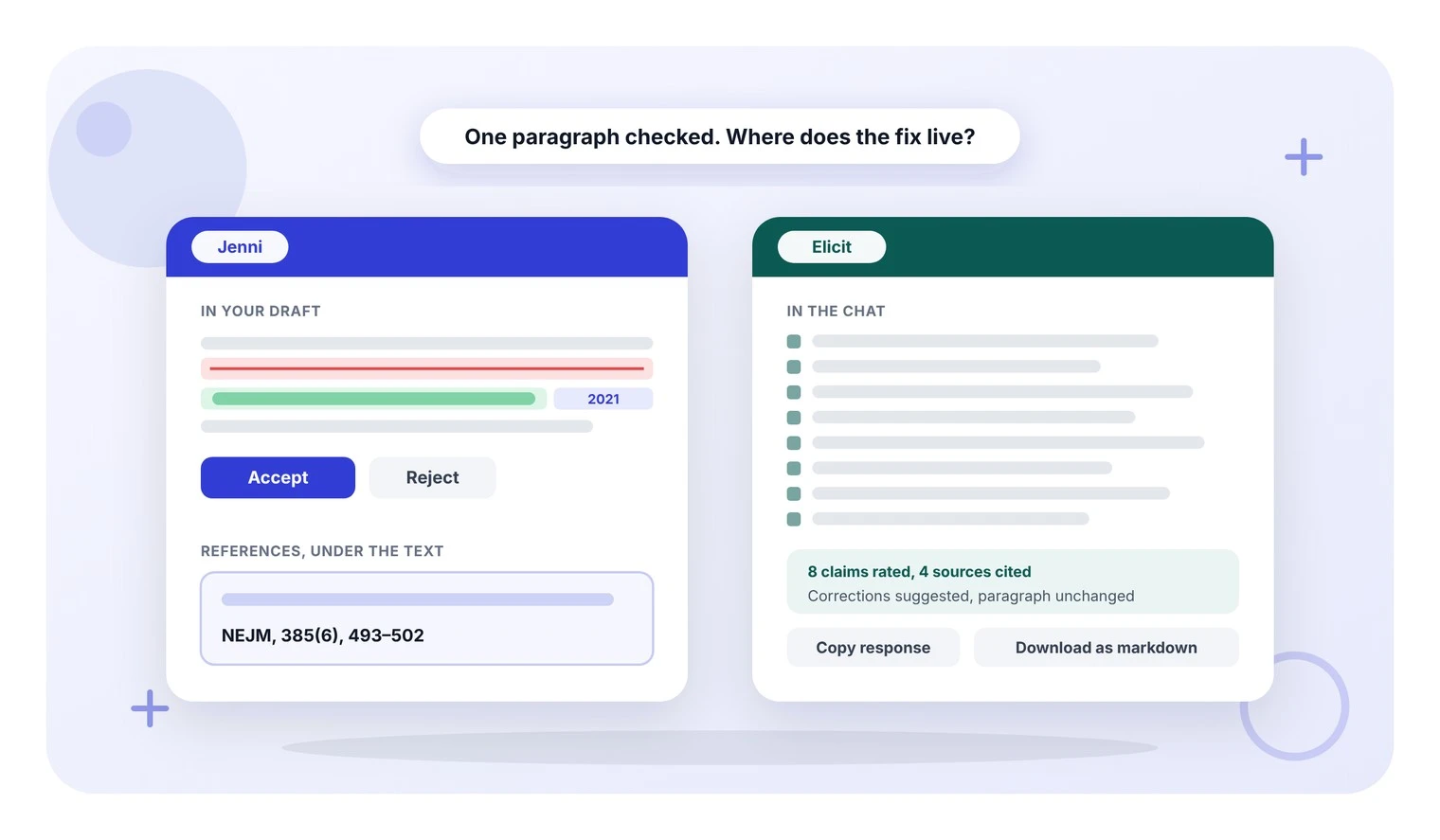
Elicit finds papers for your thesis and pulls out what they say, but writing the chapter is still your job. Your supervisor will check that each claim matches its paper and each reference is complete.
TLDR: Jenni or Elicit?
Jenni AI is an AI research and writing assistant: it finds sources and cites them inside your draft. Elicit is AI for scientific research: it finds papers and pulls their findings into tables.
Choose Jenni if - you want an overstated claim corrected inside your draft, with its source cited in full.
Choose Elicit if - you want the same details pulled from many papers into one table before you write.
Jenni | Elicit | |
Checking the claims | Edits in your draft, each quoting its source | Says if each claim is supported, draft unchanged |
Citing the claim | Citation and full APA reference in one click | Paper named, no formatted reference to paste |
Fixing a clunky sentence | Rewrite with every change marked and a short note | Rewrite only, no list of changes |
Getting the file out | Word or LaTeX, with a ready-made thesis layout | Chat answers as plain text, reports as PDF or Word |
Pulling details from many papers | Jenni does not do this | Adds a column you describe, filled for every paper |
Price | Free plan; Plus $30 a month, or $144 a year if you pay yearly; Pro $73 a month, or $348 a year if you pay yearly | Free plan; Plus $19 a month, or $132 a year if you pay yearly; Pro $69 a month, or $468 a year if you pay yearly |
More on Elicit - the Jenni review of Elicit looks at it on its own, and the Elicit vs Consensus post sets it beside another research tool.
We ran the table's checking, citing, rewriting and exporting jobs on one thesis paragraph, written with 3 problems on purpose. Its biggest problem was a trial result given with no source and no patient count. It also had a clunky sentence and a string of 3 hedge words, which make a claim sound unsure.
Elicit checked that result in a chat and said what to add, but the draft stayed as it was. In Jenni, the fix arrived inside the draft with a quote from the trial paper, and the sentence changed once we accepted it.
This post goes through:
The test - the 3 problems in the paragraph, and what one paragraph can and cannot show.
4 writing jobs - checking the claims, citing the trial, fixing a sentence and exporting the chapter.
1 research job - pulling the same details from many papers into a table, which Elicit does and Jenni does not.
Strengths and prices - where each tool is ahead and what each costs.
Which to use - 3 situations and the tool that fits each.
Fix an overstated claim where you wrote it
Claim confidence, a Jenni check, compares each claim with its source and suggests a fix inside your draft, quoting the paper
Try Jenni FreeHow we tested both tools
The test paragraph is 201 words long, about tiny fat particles that carry a gene-editing tool into the liver. We, the Jenni team, added 3 problems on purpose:
A claim with no source - the draft reports an 87% drop in a blood protein but cites nothing. The figure comes from a 2021 trial in the New England Journal of Medicine, and the draft never says how many patients it came from.
A clunky sentence - 43 words, starting with 2 grammar mistakes.
3 hedge words in a row - "could perhaps maybe". Hedge words make a claim sound less certain.
The topic is biology. Drafts in other fields have the same 3 kinds of problem, so skim the trial details if they are not your area.
What this test can and cannot show - it covers one paragraph, not a whole thesis. Of the 5 jobs, 4 are writing jobs, the side of the work Jenni is built for. The 5th is a research job, the side Elicit is built for.
Here is the paragraph, with the 3 problems in bold.
"Lipid nanoparticles have become the most clinically advanced non-viral vehicle for delivering CRISPR-Cas9 to the liver, and the reason is mostly pharmacological rather than genetic. The particle protects the messenger RNA and guide RNA in circulation, it is taken up by hepatocytes through apolipoprotein E mediated endocytosis, and the cargo is transient, so the nuclease is expressed for days rather than for the life of the cell. The first in-human systemic trial of an LNP delivered CRISPR therapy reported a mean reduction in serum transthyretin of 87 percent at the higher dose after a single infusion. There is a lot of things that still needs to be worked out though, for example how the particles behave outside the liver, whether repeat dosing causes an immune response, and what the long term editing outcomes look like at off target sites. It is possible that ionizable lipid chemistry could perhaps maybe be the main lever for extrahepatic targeting, although this has not been conclusively shown. Taken together, the evidence suggests that LNP delivery is a mature platform for hepatic gene editing and an immature one for everything else, which is the gap that most of the current preclinical work is trying to close."
Checking the claims: a fix in the sentence or advice in a chat
Winner - Jenni, because its fix went into the sentence itself, with a quote from the trial paper as its source. Both tools caught that the 87% came from a small, early result. Elicit rated all 8 claims and left its fixes in a chat.
What Jenni did
Claim confidence is the Jenni check that compares each claim with its sources. Every Jenni job ran in one document, one after another, so by this point the clunky sentence was fixed and the trial was cited. Elicit got the original paragraph, with the trial sentence worded the same.
Claim confidence made 2 suggestions inside the draft:
The trial figure - marked Overstated. The new sentence read "In an interim analysis of six patients receiving systemic LNP-delivered CRISPR therapy, mean serum transthyretin fell by 87 percent at the higher dose at day 28." Interim means an early look at the data, before the trial ends.
The sentence on how the particles get into liver cells - marked Unsupported. Jenni reworded it to match what the trial paper says and cited that paper.
We accepted both, and each edit showed a quote from the trial paper as its source. Jenni's summary also pointed to one claim it did not change: the paragraph's opening line, which still has no citation.
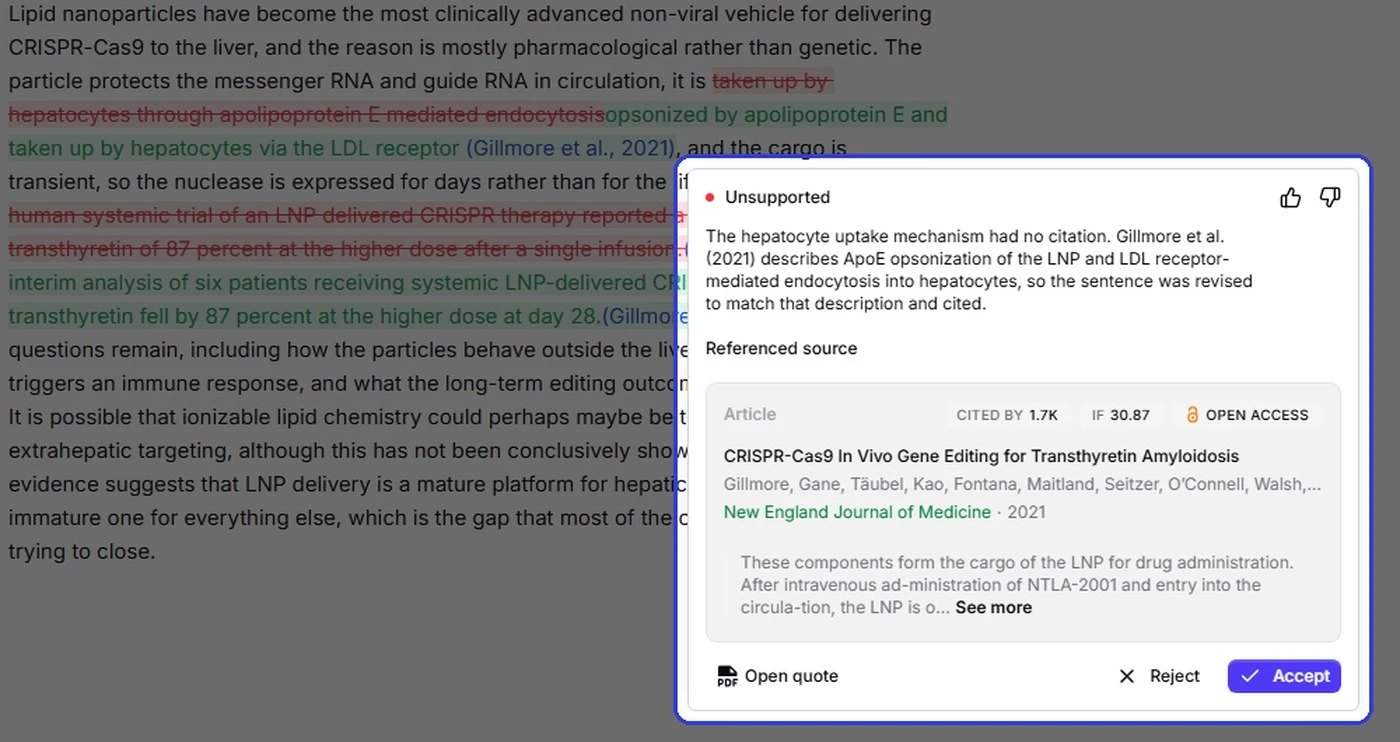
Both Jenni edits in the paragraph, with the suggestion for the particle-entry sentence open
The trial edit had 2 catches, so read each suggestion before you accept it:
A detail dropped - "after a single infusion", which the trial abstract supports.
A loose count - the new sentence sets the 87% beside 6 patients, though only 3 of them got the higher dose.
Claim confidence left the 3 hedge words alone, but Peer Review, the Jenni check that reads a draft like a reviewer, commented on them. Its comment began "“Could perhaps maybe” stacks hedges without clarifying the degree of uncertainty." and went on to suggest a narrower, supported point.
What Elicit did
We gave Elicit the original paragraph and asked it to flag any claim that is unsupported or overstated. It rated all 8 claims in the paragraph and gave reasons and a source for each, drawing on 4 sources in total.
On the trial figure it said "supported, but specify the endpoint and timing", and named the group: 3 participants on the higher dose, measured at day 28.
On the sentence with the 3 hedge words it said "plausible, not established as the main lever". Its rating was about the claim itself: the research backs the idea as one possible lever for reaching other organs, not the main one.
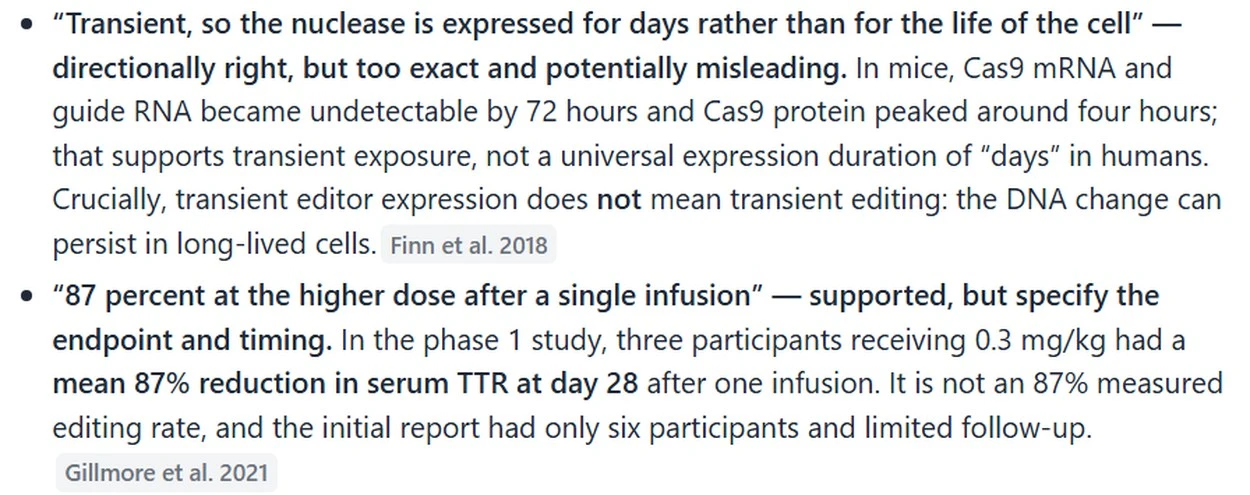
Elicit rates each claim in its chat answer, with a source for each
The paragraph itself did not change. To use a fix from Elicit, you copy the wording into your draft by hand.
Citing the claim: a reference in the draft or a paper in a list
Winner - Jenni, because one click put the citation and a complete APA reference into the draft. Elicit named the same trial and gives no formatted reference to paste.
What Jenni did
In Jenni's citation search, we typed the claim's key terms. A 2022 reprint with the same title came 4th and the 2021 trial came 5th, so check the year before you cite.
One click on the trial added (Gillmore et al., 2021) after the sentence and started an APA reference list under the paragraph. APA is one of the 10,000+ citation styles Jenni lists, and this test checked APA only. The reference has the volume, issue and pages, "385(6), 493–502", plus the DOI.
What Elicit did
We gave Elicit the trial sentence from the draft. It said the sentence matches the trial and named the trial paper, by Gillmore et al. Its table of 10 results put the trial 3rd, after a 2022 review and a company press release.
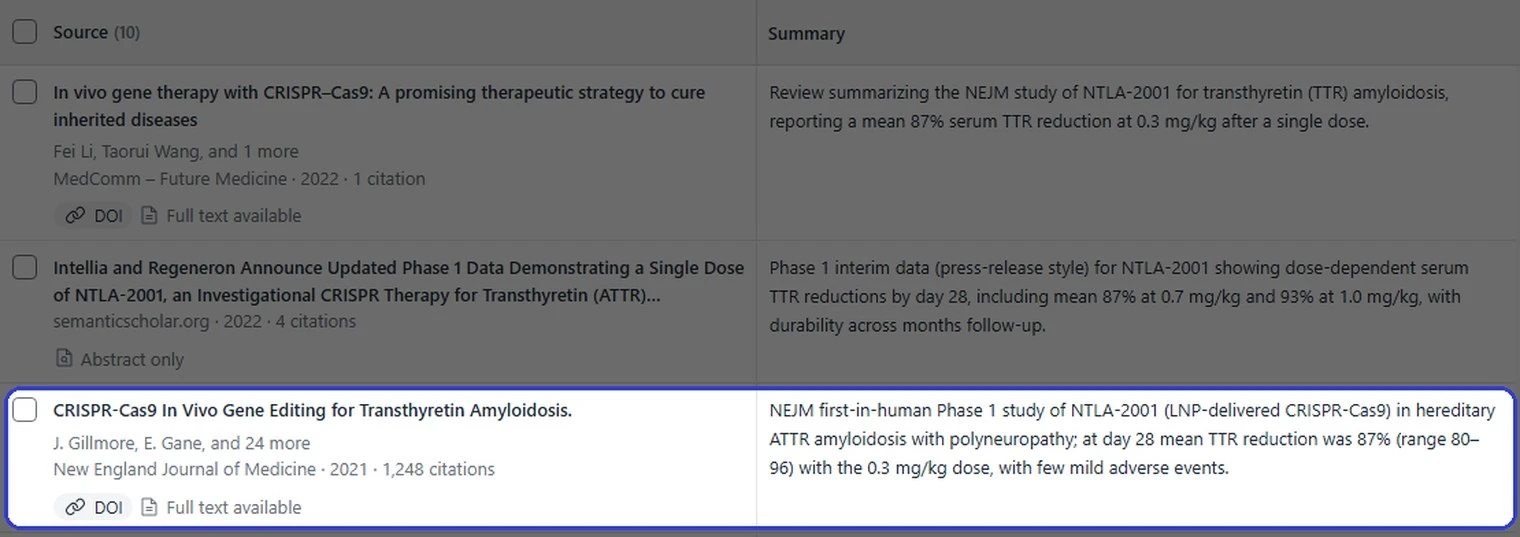
The top of the Elicit table, with the 2021 trial in third place
Each paper opens in a panel with its title, authors, journal, DOI and abstract. There is no formatted reference and no citation to place, because Elicit has no editor for your draft.
Fixing a clunky sentence: a marked rewrite or a plain one
Winner - Jenni, because its rewrite shows every change, with a note on what changed. Both tools fixed the 2 grammar mistakes.
Jenni - its fluency edit, which smooths the wording of a sentence you select, cut 43 words to 28. It returned
"Several questions remain, including how the particles behave outside the liver, whether repeat dosing triggers an immune response, and what the long-term editing outcomes are at off-target sites."
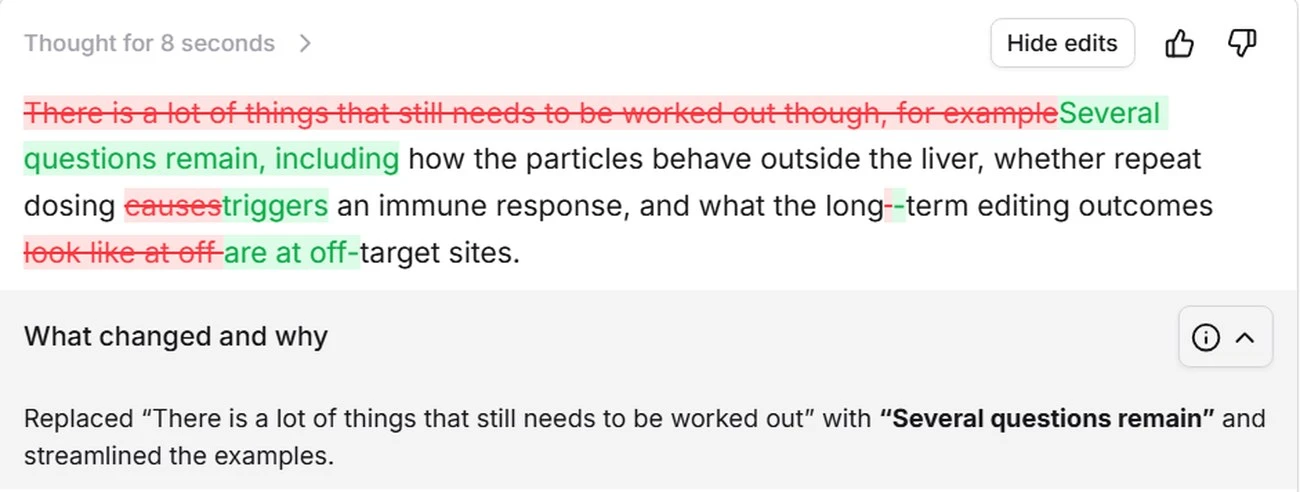
The Jenni rewrite marks each change, with a note under it
Removed words show crossed out in red and new ones in green, so you can check each change before the new sentence replaces yours.
Elicit - its rewrite came back alone, 27 words with no note: "Many questions remain, including how the particles behave outside the liver, whether repeat dosing triggers an immune response, and what long-term editing outcomes occur at off-target sites." To use it, compare it with your sentence and paste it in.
Getting the file out: a LaTeX thesis file or a markdown download
Winner - Jenni, for a .tex file of the chapter with a thesis layout already set. An Elicit chat answer downloads as markdown, a plain-text format.
Exporting from Jenni
Jenni exports your draft to Word or to LaTeX, a typesetting format. If you write your thesis in LaTeX, pick the layout named "Thesis or report": "Report class, 12pt, 1.5 spacing, with a table of contents."
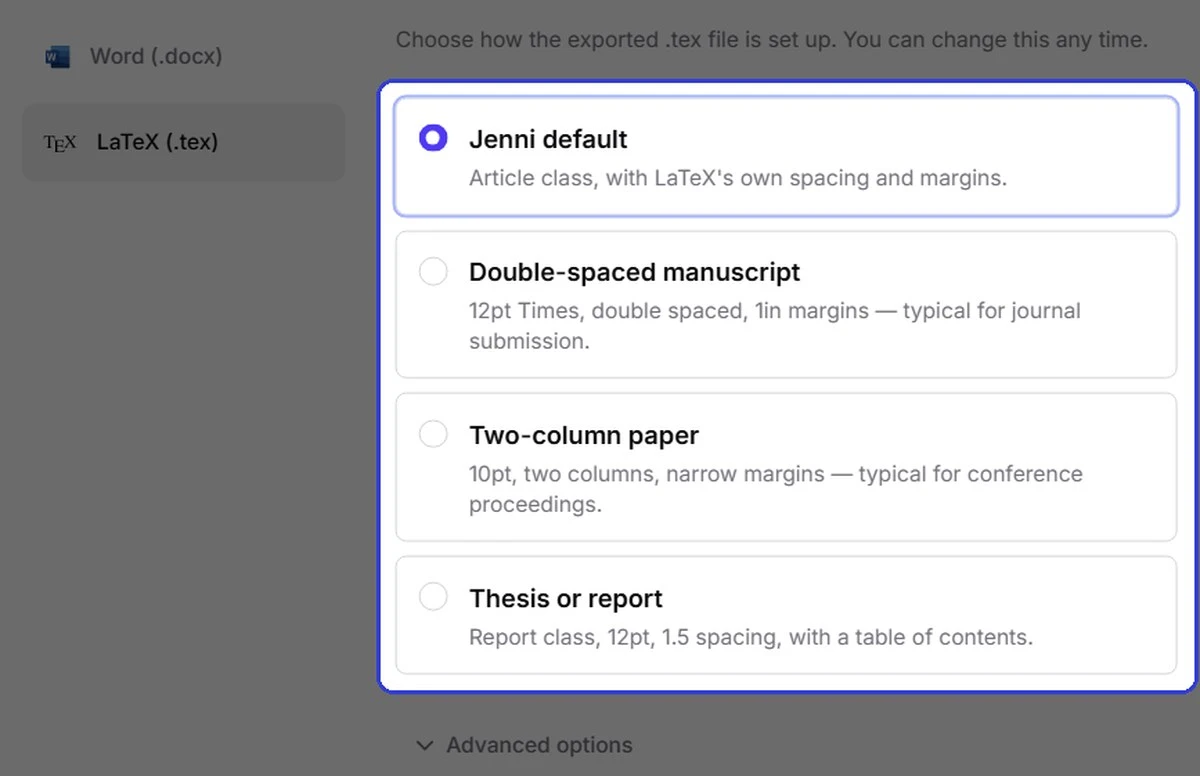
Jenni exports LaTeX with a thesis layout ready
Exporting from Elicit
An Elicit answer has 2 buttons, Copy response and Download as markdown. Elicit's help page says its Research Reports export as PDF or Word files, and we did not export one.
Save your chapter as a LaTeX thesis file
Export the draft as a .tex file with the Thesis or report layout, 12pt with 1.5 spacing and a table of contents
Start Writing FreePulling details from many papers: a job Jenni does not do
Winner - Elicit, because it filled the same 2 columns for every row of a 9-row table of human trials. Jenni has no table like this.
The test paragraph rests on one trial, so we asked Elicit which clinical trials in humans have tested this kind of treatment. It returned a table of 9 results, with the 2021 trial first.
We then added 2 columns, each with a one-line instruction: the number of people treated, and the main result with its time point. Elicit filled both columns for all 9 rows. In the screenshot, each cell in the 2 new columns names the paper its answer came from.
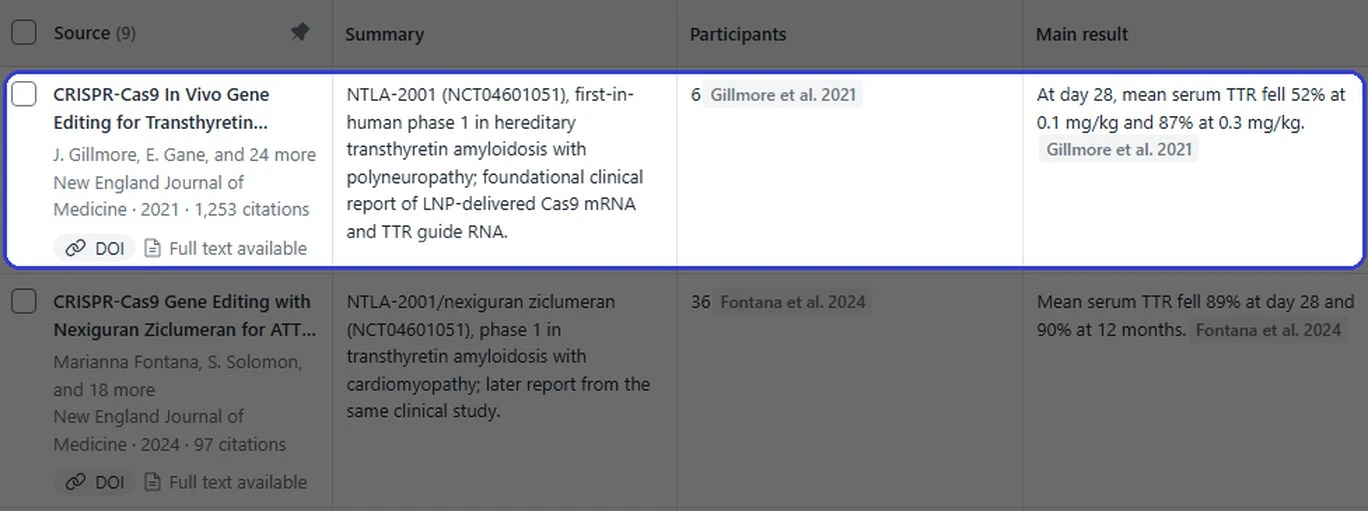
Elicit filled in the participants and the main result for each paper
For the 2021 trial it gave 6 participants and "At day 28, mean serum TTR fell 52% at 0.1 mg/kg and 87% at 0.3 mg/kg."
TTR is the blood protein from the test, and mg/kg is the dose per kilogram of body weight. Those are the details the test draft left out: how many people were treated, and the exact dose behind the 87%.
It also flagged its own gaps. For one paper the abstract did not say when the result was measured, and one row was a company announcement with no results.
Where Jenni is ahead
Fixes inside the draft - accept a Claim confidence edit and the sentence changes, with its source quoted in the suggestion.
A complete reference in one click - the citation and its APA entry, with volume, issue and pages.
Rewrites you can check - every change marked, with a note on what changed.
A LaTeX file in thesis shape - the thesis layout, with a table of contents, is one option in the export.
What Elicit has that Jenni does not
Tables that pull details from many papers - add a column, and Elicit fills it for every paper. Jenni's nearest feature is AI Chat, which answers questions about the papers you have saved in Jenni, with citations.
A screening workflow for systematic reviews - Elicit's pricing page lists one that can screen 5,000 papers. Jenni has no screening tool. The closest it offers is one library for your PDFs and your Zotero or Mendeley imports.
A summary on every paper in a list - each row of an Elicit table has one. Jenni's search cards show citation counts, impact factor and a passage from the paper instead.
What each tool costs
Plan | Jenni | Elicit |
Free plan | Free - $0; 10 AI Autocompletes (sentence completions) a day; 3 AI Edits (rewrites); 5 AI Chat messages; 3 Reviews (draft checks); unlimited citations | Basic - $0; unlimited search across more than 138 million papers; limited use of the Research Agent, the chat we used for these tests, and of Research Reports |
First paid plan | Plus - $30 a month, or $144 a year | Plus - $19 a month, or $132 a year |
Second paid plan | Pro - $73 a month, or $348 a year | Pro - $69 a month, or $468 a year |
Third paid plan | No third paid plan | Scale - $149 a month, or $1,068 a year |
Prices from jenni.ai/pricing and elicit.com/pricing.
Yearly billing - paying for a year at once costs far less. Jenni Plus is $144 a year, against $360 for 12 monthly payments.
First paid plan - Elicit Plus costs 19 against $30), and 132 against $144).
Second paid plan - on yearly billing, Jenni Pro costs 348 against $468). On monthly billing it costs 73 against $69).
What Jenni Plus covers - 500 AI Edits and 10 Reviews a month. Jenni Pro removes both caps.
What Elicit Plus adds - export to reference-manager files (RIS, BIB), spreadsheets (CSV), PDF and Word (DOCX), and up to 5 table columns at a time.
About the Elicit prices - these are its Academic plans. The pricing page opens on Industry plans, where Pro and Scale cost more on yearly billing, so switch to Academic.
Which one should you use?
If your supervisor asks where a figure came from
Use Jenni - run Claim confidence on the paragraph, accept the edits that match your source, and restore any detail an edit removed if the source supports it. Then cite the source with Jenni's citation search, which adds its full reference in the same draft.
Cite a source without leaving your draft
Jenni searches papers for the sentence at your cursor, then adds the citation and its full APA reference in one click
Start Writing FreeIf you are reviewing many studies before you write
Use both - build the table of studies in Elicit, with a column for each detail you need. Export the papers as a BibTeX or RIS file (see What each tool costs) and import it into Jenni. Then write the chapter there and cite each paper you keep.
If your chapter goes out as LaTeX
Use Jenni - export with the thesis layout. The references go with it as a .bib file.
Map the studies in Elicit. Write the chapter that cites them in Jenni, where each claim gets checked and each citation adds its reference to the list.