By
Justin Wong
—
Semantic Scholar Review: Does It Find Better Papers Than Google Scholar?

Justin Wong
Head of Growth
Graduated with a Bachelor's in Global Business & Digital Arts, Minor in Entrepreneurship
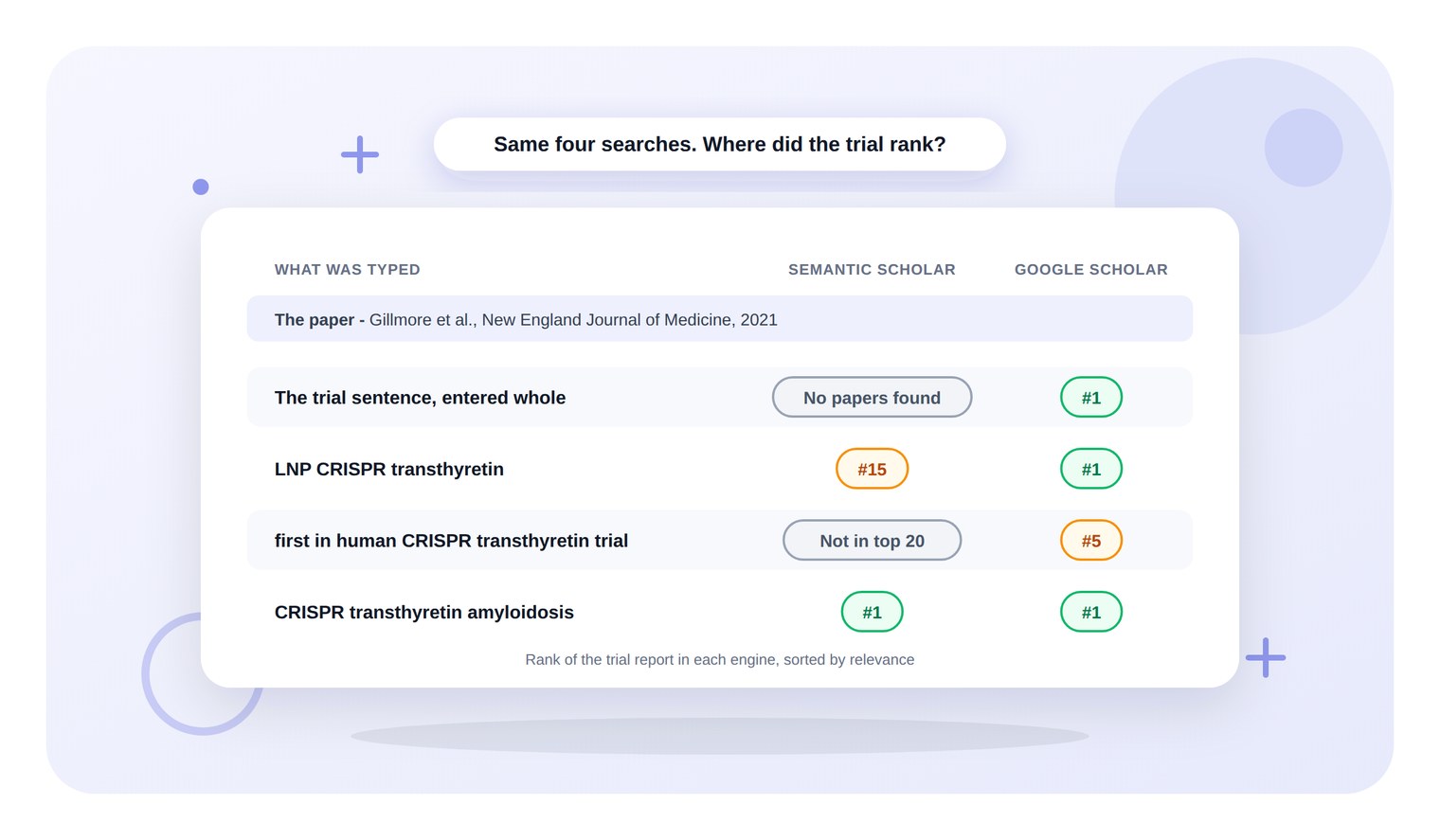
Entered whole into Semantic Scholar, one sentence from a CRISPR draft matched 0 of the 238,539,980 papers its search box offers. Google Scholar, given the same sentence, ranked the 2021 NEJM trial report first.
Cut down to the keywords CRISPR transthyretin amyloidosis, the search put that trial at the top in Semantic Scholar too, and the trial's page counted its background, methods and results citations separately. In this test, Semantic Scholar rewarded keyword searching and checking how a source has been read, not entering a claim and asking for its source.
<CTA title="Search for the paper without leaving the draft" description="Search for a paper from inside the document, and one click files the in-text citation and its reference together" buttonLabel="Try Jenni Free" link="https://app.jenni.ai/register" />
TLDR
Semantic Scholar | |
Verdict | Strong for reading citations, weaker at matching a claim |
Best for | Seeing how later papers cited a source |
Weak spot | A whole sentence returned No Papers Found |
Price | Free, with no paid plan |
What was tested | Four searches and the Cite dialog, beside Google Scholar |
Pair it with | Jenni, for citing in the draft with full references |
Is Semantic Scholar better than Google Scholar for finding papers?
Not on this test. The target was one paper, Gillmore et al.'s 2021 report of the first-in-human NTLA-2001 trial in the New England Journal of Medicine, and the same four searches went into both engines with results sorted by relevance.
The trial sentence, entered whole - Semantic Scholar returned No Papers Found. Google Scholar listed about 254 results and ranked the NEJM report 1st.
LNP CRISPR transthyretin - the trial ranked 15th of 454 in Semantic Scholar and 1st of about 2,580 in Google Scholar.
first in human CRISPR transthyretin trial - Semantic Scholar did not show the trial in its first 20 results. Google Scholar ranked it 5th.
CRISPR transthyretin amyloidosis - both engines ranked the trial 1st.
So Google Scholar matched or beat Semantic Scholar on every search here. Where Semantic Scholar pulled ahead was after the paper was found, in what it showed about how later work has cited it.
<ProTip title="🔎 Search in keywords, not sentences:" description="Strip the claim down to the method and the condition, such as CRISPR transthyretin amyloidosis. That three-word search put the trial first, where the full sentence matched nothing" />
What Semantic Scholar is
Semantic Scholar is a search engine for research papers from Ai2, which its about page describes as a non-profit research institute. The same page calls it a free AI-powered research tool for scientific literature, and its search box offered 238,539,980 papers on the day of the test.

Four features sit on top of the search and set it apart from a plain index:
TLDR - a short AI summary shown on results. The FAQ says these cover computer science and biomedical papers.
Citation types - citing papers sorted into background, methods and results citations, with a count of highly influential ones.
Excerpts - the sentence a citing paper wrote about the source, shown under its result.
Semantic Reader - a PDF reader offered on some papers, where an in-text citation opens a card about the cited paper.
The trial's page also carried Save to Library and Create Alert buttons. This test did not use either, because both change the account.
Who Semantic Scholar is for
It fits the reading stage of research, once the topic words are known. Three readers get the most from it:
The PhD student mid-literature review - who needs to see which later studies cite a key paper's results, not just how often it was cited.
The researcher revising a manuscript - who wants to check how a cited trial has been described since publication.
The Masters student with a supervisor asking where a claim came from - as long as the search is phrased as keywords.
It is not a writing tool. It finds and explains papers, and the citing still happens somewhere else.
The search test
The test claim came from the CRISPR paragraph used across these tool reviews: "The first in-human systemic trial of an LNP delivered CRISPR therapy reported a mean reduction in serum transthyretin of 87 percent at the higher dose after a single infusion."
The sentence, entered whole
Typed into the Semantic Scholar search box and run, the sentence brought back a page headed No Papers Found, with the line "Sorry, there are no results for" and the sentence repeated. Removing the final full stop and running it again gave the same page.

Semantic Scholar after the trial sentence was entered in its search box
Google Scholar took the same sentence, full stop included, and returned about 254 results with the NEJM report 1st. For a student who works by copying a claim out of a draft, that is the gap that matters most.
Three keywords instead
The search CRISPR transthyretin amyloidosis returned about 7,930 results, and the first was the trial report, dated 26 June 2021, with 1,239 citations and a TLDR under the author line.
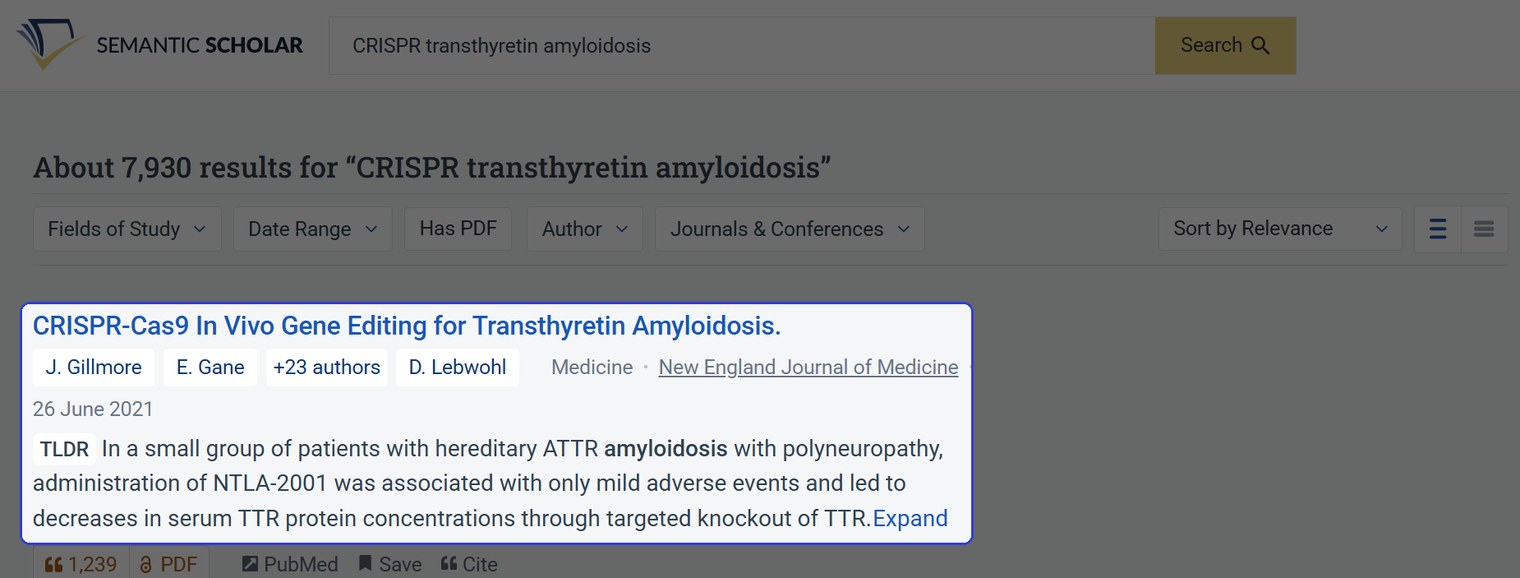
The first result for CRISPR transthyretin amyloidosis, with its TLDR
The filter bar above the results offers Fields of Study, Date Range, Has PDF, Author, and Journals & Conferences. None was needed here, because the trial was already first.
A second record with the same title
Result 10 on that page carried the trial's exact title, the same journal and a date of 28 October 2021, with 83 citations of its own. Its DOI ends NEJMc2114592, which PubMed lists as the authors' 2-page reply to letters about the trial, while the trial report ends NEJMoa2107454.
A student who saved the wrong one would cite a reply in place of a trial. Google Scholar also listed a second record with the trial's title, at result 4 for the whole sentence, so the check applies in both engines.
<ProTip title="🧾 Compare the DOIs before you save:" description="When two results share a title, open both and compare the DOIs. Here the trial ended NEJMoa2107454 and the reply to letters ended NEJMc2114592" />
How far to trust what it shows
The TLDR leaves out the numbers
The TLDR on the trial reads: "In a small group of patients with hereditary ATTR amyloidosis with polyneuropathy, administration of NTLA-2001 was associated with only mild adverse events and led to decreases in serum TTR protein concentrations through targeted knockout of TTR."
That is the abstract's conclusions sentence, word for word. It carries no dose and no percentage, so it cannot confirm the 87% in the draft.
The figures are one click away. Expand opens the abstract, whose results section gives 52% at 0.1 mg per kilogram and 87% at 0.3 mg per kilogram at day 28, matching the PubMed record.
<ProTip title="📑 Open the abstract before you quote:" description="On this trial the TLDR named the outcome but gave no figure. Click Expand and take any number from the results section of the abstract" />
Citation counts differ between engines
Semantic Scholar showed 1,239 citations for the trial. Google Scholar showed Cited by 2180 for the same paper on the same evening.
So quote a citation count with the engine it came from, and compare it only with other counts from that engine.
The Cite button needs a second look
The Cite dialog offers BibTeX, MLA, APA and Chicago, plus BibTeX and EndNote export. The APA tab produced this for the trial:

The APA tab of the Semantic Scholar Cite dialog for the trial
Set against the PubMed record, which gives volume 385, issue 6, pages 493 to 502, the entry has four problems:
No volume, issue or pages - the entry ends at the journal name.
No DOI - Purdue OWL notes that APA 7 includes a DOI when one is available, and this trial has one.
All 26 authors listed - APA 7 lists the first 19, then an ellipsis, then the last author, as Purdue OWL and the guide to citing multiple authors in APA both set out.
Journal capitalisation - the journal reads The New England journal of medicine.
The MLA tab ended with n. pag., meaning no page numbers, for a paper that has them. The BibTeX entry had no volume, pages or DOI field, and pointed its url at the Semantic Scholar API.
Google Scholar's APA version for the same paper was closer, with volume 385, issue 6 and pages 493-502. It listed 6 authors, then an ellipsis and an ampersand before the last author, and it had no DOI either.
<ProTip title="🧩 Check the reference against PubMed:" description="Open the paper on PubMed and copy the volume, issue, pages and DOI into the entry. The Cite dialog left all four out for this trial" />
Where Semantic Scholar earns its place
A citation panel sorted by type
The trial's page shows 1,239 citations in total and breaks some of them down by type. Highly Influential Citations reads 55, Background Citations 209, Methods Citations 43 and Results Citations 4.

The citation panel on the trial page in Semantic Scholar
Google Scholar gave a single Cited by count. For a literature review, the Results list is a quick way into the papers that cite the trial's results.
Excerpts show what the citing paper said
Filtering the citations to Results Citations left 4 papers, each with a Highly Influenced badge. Opening the excerpts on a 2023 commentary in Global Cardiology Science and Practice showed the citing sentence itself.
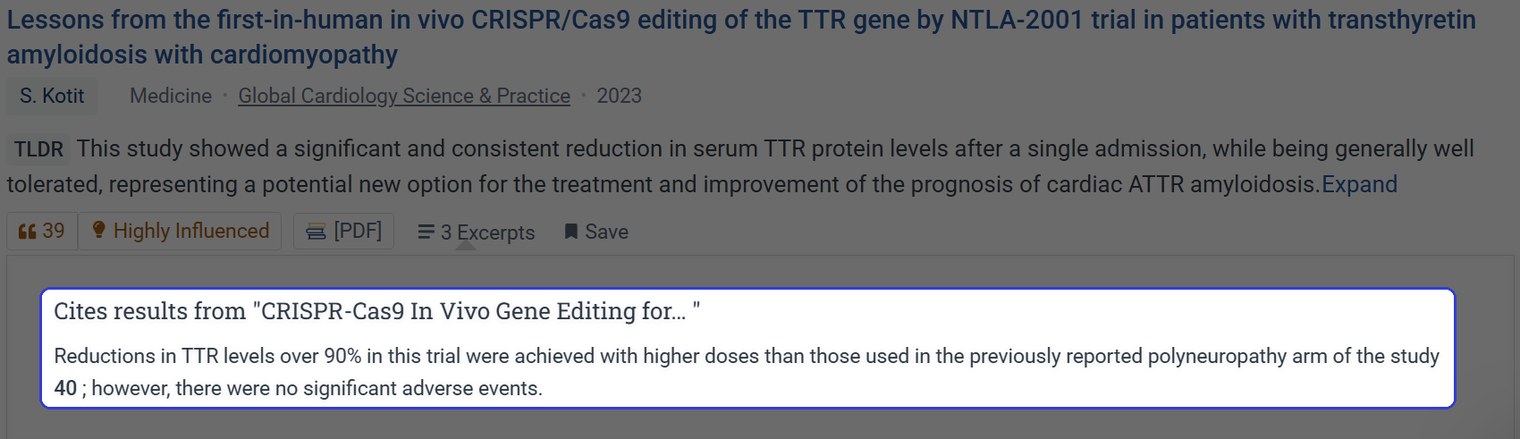
A citing paper and its excerpt, labelled Cites results from
It reads "Reductions in TTR levels over 90% in this trial were achieved with higher doses than those used in the previously reported polyneuropathy arm of the study 40 ; however, there were no significant adverse events." That shows how the trial is being used before either paper is opened, which a plain citation count cannot.
<ProTip title="🧭 Filter citations by Results:" description="On a key paper, set Citation Type to Results Citations, then open the excerpts. Each one shows the sentence where a later paper cites its results" />
Citation cards inside the reader
The trial report itself opened only through nejm.org and PubMed, with no reader link. The 2023 commentary had a reader link and opened in Semantic Reader.

Clicking citation 40 in Semantic Reader opened a card for the cited trial
Clicking its citation number 40 opened a card for the NEJM trial with the title, authors, journal, date and TLDR, plus badges reading 1,239 and 55, the same figures as the trial's citation and highly influential counts.
What Semantic Scholar costs
Nothing. Semantic Scholar has no paid plan, and its FAQ calls it a free tool, so the case for it rests on the tasks in this review rather than price.
Tool | Price | What it covers |
Semantic Scholar | Free | Search, TLDRs, citation types, excerpts, Semantic Reader |
Jenni | Free; Plus $30 a month or $144 a year; Pro $73 a month or $348 a year | Drafting, citing at the cursor, the five reviews, Word and LaTeX export |
October 2026 pricing, read on 4 October from semanticscholar.org/faq and jenni.ai/pricing.
Semantic Scholar against the alternatives
Google Scholar - on this test, the better pick for entering a claim and getting its source back. The Google Scholar guide covers its search operators, such as quotation marks and OR.
Elicit - Elicit took the same whole sentence on the same day as a Find papers request and put the NEJM report first in a 3-row table. On that run, it found the source from the claim where Semantic Scholar returned nothing.
Jenni - it works at the other end, in the draft. Its Cite button opens a paper search at the cursor, and one click files the in-text citation and the reference together.
In a test on 1 October, its APA entry for this same trial listed the first 19 authors, an ellipsis and the last author, then volume 385, issue 6, pages 493 to 502 and the DOI.
When the title was typed into that search, Jenni ranked a 2022 reprint with the same title above the NEJM report, so the DOI check applies there too.
Papers found in Semantic Scholar can come across by DOI, or through the Zotero and Mendeley import. The Jenni vs ChatGPT comparison ran a similar find-the-trial test against a chatbot, and the guide to medical research databases lists where else to search for clinical work.
Should you use Semantic Scholar for a thesis?
Yes, alongside Google Scholar rather than in place of it. On this test Google Scholar tracked the claim back to its source, and Semantic Scholar showed who cited the trial's results and what they said.
Do not take a citation from either Cite button as finished. Check the DOI, the volume and the pages against the PubMed record, and check that the source says what the sentence claims, as a real source behind a wrong claim explains.
<CTA title="Cite the paper and get the whole reference" description="Jenni filed this trial with its volume, issue, pages and DOI, and the style picker reaches more than 10,000 citation styles" buttonLabel="Start Writing Free" link="https://app.jenni.ai/register" />
For the writing itself, draft the thesis in Jenni, where the citations and the reference list sit in the same file as the chapters, and Claim confidence reviews each claim against published sources.