By
Nathan Auyeung
—
Elicit vs SciSpace: Which Extracts Data From Papers More Accurately?

Nathan Auyeung
Senior Accountant at EY
Graduated with a Bachelor's in Accounting, completed a Postgraduate Diploma of Accounting
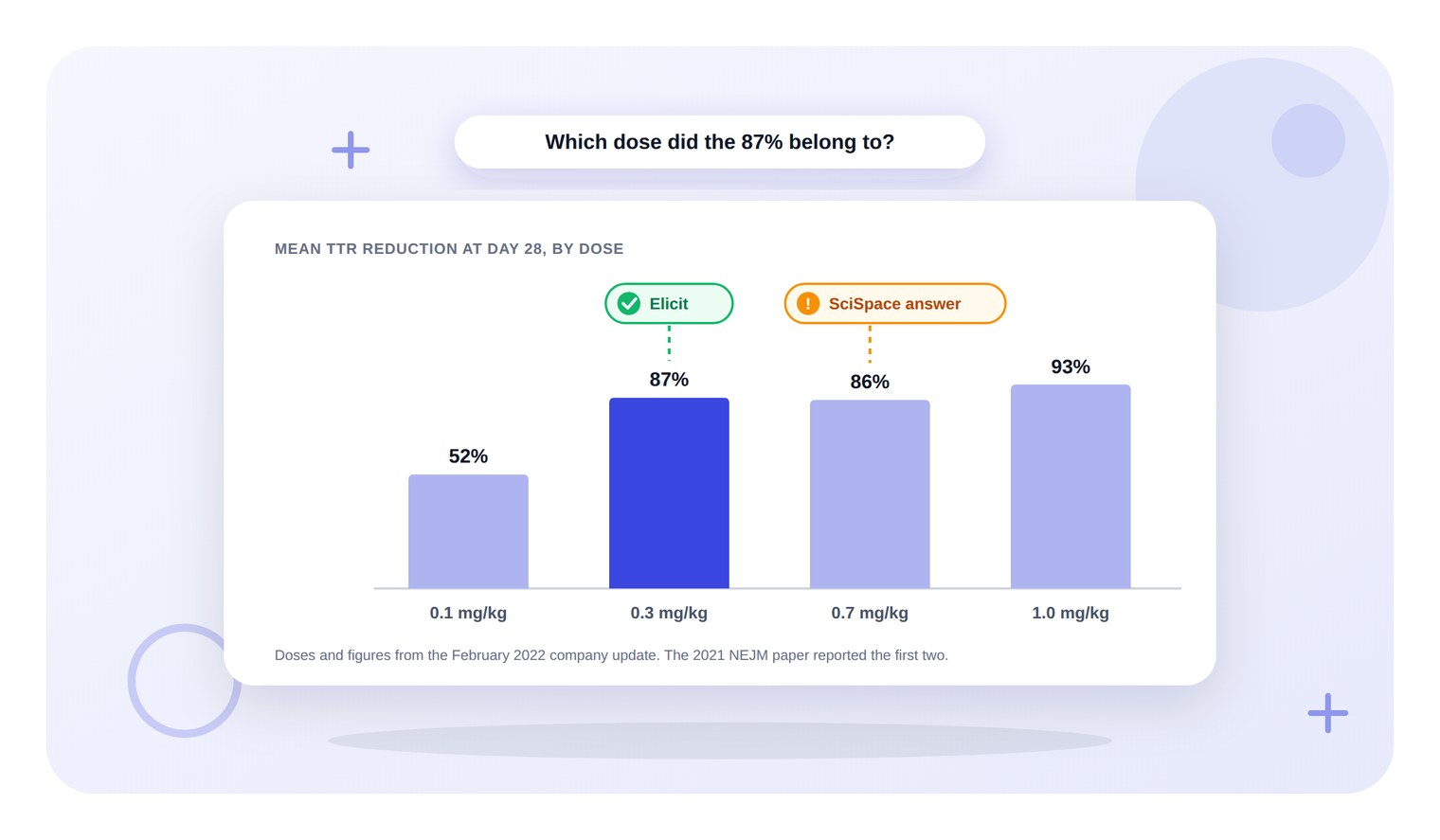
The same trial sentence went into both tools on the same evening, a few minutes apart. Elicit returned a 3-row table with the 2021 NEJM report first, and its extraction column gave 52% for 0.1 mg/kg and 87% for 0.3, matching the paper.
Answering from its top 5 papers, none of them that report, SciSpace's summary put the 87% at 0.7 mg/kg. For a literature review that must cite the primary trial, start in Elicit, and keep the wider SciSpace table for scoping.
<CTA title="Search your saved papers down to the PDF text" description="The Jenni Library searches titles, authors, abstracts and full PDF text by meaning or by keyword, so a checked figure is easy to find again" buttonLabel="Try Jenni Free" link="https://app.jenni.ai/register" />
Elicit or SciSpace: the decision up front
Pick Elicit - when a draft makes a claim and the primary paper behind it has to be found and quoted. It put the trial first and pulled both dose figures from it correctly.
Pick SciSpace - when the job is a wide first sweep of a topic. It showed 10 of 100 papers, wrote a summary, and offers ready-made columns such as Conclusions, Methods Used and Limitations.
Either way - check every extracted figure against the paper before it goes into a chapter. One SciSpace cell held a figure its paper does not contain.
The run, step by step
The input was one sentence from the CRISPR paragraph used across these tool reviews: "The first in-human systemic trial of an LNP delivered CRISPR therapy reported a mean reduction in serum transthyretin of 87 percent at the higher dose after a single infusion."
The paper behind it is Gillmore et al. (2021) in the New England Journal of Medicine, which reports a mean fall of 52% at 0.1 mg per kilogram and 87% at 0.3 mg per kilogram by day 28, per the PubMed record.
The same sentence in both
Elicit - the Find papers chip, then the sentence. Its first status line read "Searched for the clinical trial paper behind the reported TTR reduction".
It was still retrieving at the 30.5-second check, and the table was complete at the 66.9-second check.
It held 3 rows, each with Summary and Relevance columns:
Row 1 - the 2021 NEJM trial report, 1,204 citations, marked Full text available. Relevance: "Direct match to the reported 87% result."
Row 2 - Fontana et al. (2024), a later NEJM study of the same therapy in cardiomyopathy, labelled a subsequent clinical follow-up.
Row 3 - a 2021 commentary on the trial in Molecular Therapy, marked Abstract only. Relevance: "Secondary perspective on the original trial; use the primary NEJM paper for the result."
SciSpace - the Literature Review page, headed Literature Search, in Standard mode, one of its 3 modes. High Quality and Deep Review were not run. The answer and the table were on screen at the first check, about 16 seconds after the click.
The table showed 10 of 100 papers. The 2021 NEJM report was not among the 10, and a company press release, Intellia and Regeneron Announce Updated Phase 1 Data, was first. A second press release sat 5th.
The rest included a 2023 Kotit paper, the 2024 Fontana study, a 2025 NEJM follow-up in polyneuropathy, a book chapter, 2 other papers and a conference abstract on a different gene target.
Each row carries an Insights cell that says how the paper relates to the query. Row 2, a preclinical lipid study, was flagged: "The paper's title matches your query, but it doesn't address your specific question."
The toolbar above the table offers Open Access, Top papers, Filters and a relevance sort, and Load more papers pages through the other 90.
<ProTip title="🏛️ Ask for the journal article:" description="If the top result is a press release, search again with the trial name and the journal. The 2021 NEJM report is the citation a supervisor expects for this figure" />
The answer each tool wrote
Elicit's chat answer named the paper and the dose correctly: "The statement matches Gillmore et al.'s 2021 primary report", and "reports an 87% mean serum TTR reduction at day 28 in the 0.3 mg/kg cohort after a single dose."
It then offered two follow-ups, one to find the full text and DOI for the 2021 paper and one to compare the first trial with later NTLA-2001 results.
SciSpace's answer, built from its top 5 papers, said the trial "reported a mean reduction of 93% in serum TTR at the highest dose of 1.0 mg/kg". Its dose-response bullet then read "Lower doses also showed significant reductions, with 87% at 0.7 mg/kg", citing the updated-data release.
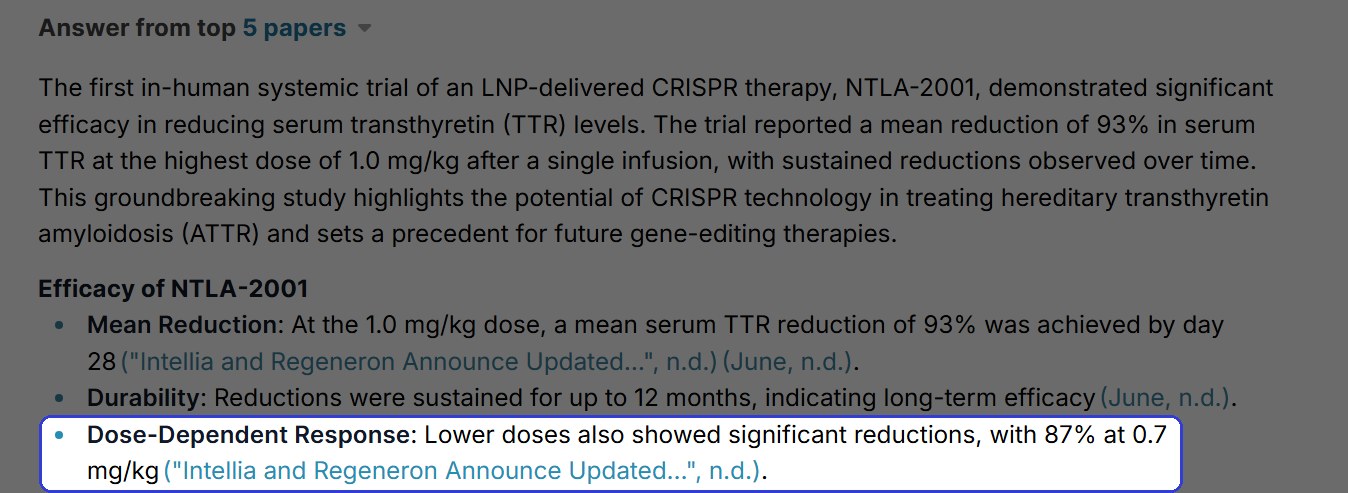
The SciSpace answer, with the line that puts 87% at 0.7 mg/kg
The release itself, dated 28 February 2022, gives 52%, 87% and 86% for the 0.1, 0.3 and 0.7 mg per kilogram groups and 93% for 1.0. So 87% belongs to 0.3, and 0.7 was 86%.
The Insights column went further on row 1, telling the writer the trial reported 93% at 1.0 mg/kg, "not 87%". The 87% is the NEJM paper's figure for its higher dose, and 93% at 1.0 comes from a later update on extra dose groups.
<ProTip title="📏 Check the dose, not just the percent:" description="A figure can be right and still sit against the wrong dose group. Match each percentage to its dose in the paper before it goes into a sentence" />
The extraction column
Elicit's New column panel asks for example extractions in its placeholder text, so the instruction carried one. SciSpace's instruction box is optional, with a 150-word limit, and took the same text unchanged.
Both tools got a column with the same name, TTR reduction by dose, and the same instruction: "For each dose group, the mean percent reduction in serum TTR at day 28 (e.g., "1.0 mg/kg: 40%"). Write "not reported" if the paper gives no dose-level figure."
Elicit - Add a column opened a New column panel, and the column was filled at the 30.4-second check. The trial row read "0.1 mg/kg: 52%; 0.3 mg/kg: 87%", matching the abstract, and the Fontana and commentary rows read not reported.
The chat note said why those two read not reported: the later trial paper and the commentary "do not report dose-level day-28 means in their source text." The Fontana abstract bears that out, with pooled figures only.
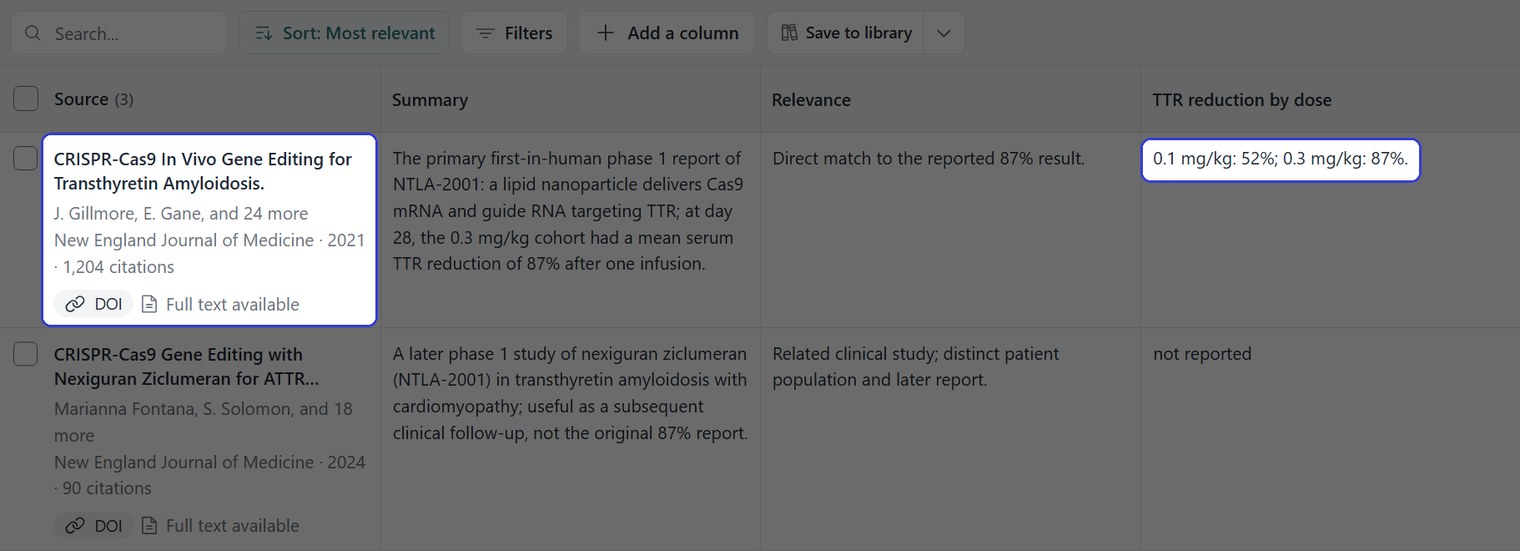
The Elicit table with the trial row and its extraction cell
SciSpace - the Add a Column panel offers Create new column and a list of suggested columns, including TL;DR, Conclusions, Results, Methods Used and Limitations. Rows 1 to 3 were filled at the 20.1-second check, and the rest filled as the table was scrolled.

Row 1 of the SciSpace table, with its Insights cell and its extraction cell
Six SciSpace cells were checked against their sources:
The updated-data release - 52%, 87%, 86% and 93% for the four doses, matching the release.
Onuma et al. (2024) - a more than 98% reduction after a single dose of the optimal lipid, quoted from the abstract of a preclinical study, and noted as not a day-28 dose figure.
Kotit (2023) - 92% at 0.7 mg/kg and 92% at 1.0 mg/kg in NYHA I/II, and 94% at 0.7 mg/kg in NYHA III, matching the abstract.
Fontana et al. (2024) - not reported by dose. The abstract gives only pooled figures, -89% at 28 days and -90% at 12 months.
Gillmore et al. (2025) - -90% at day 28, pooled, matching the abstract.
Brannagan et al. (2022) - "1.0 mg/kg: 40%". The full text on PubMed Central has no 40% figure. It reports a dose-dependent reduction with no number, and its Table 1 gives the dose as up to 1 mg/kg, single.
The Brannagan cell is word for word the example inside the instruction. Two other rows, the 2024 book chapter and a 2026 paper, came back with a dash and no figure.
<ProTip title="🧩 Watch for cells that echo the example:" description="One SciSpace cell matched the example in the instruction word for word. Check any cell that repeats your example against the paper before it goes into a table" />
The literature review matrix template is a way to lay out the same columns by hand.
Side by side
Elicit | SciSpace | |
Papers in the table | 3 | 10 shown of 100 |
The 2021 NEJM trial | Row 1 | Not in the top 10 |
Answer on the 87% figure | 87% at 0.3 mg/kg, matching the paper | 87% at 0.7 mg/kg, against its own source |
Table on screen | By the 66.9-second check | About 16 seconds |
Extraction column filled | By the 30.4-second check | Rows 1 to 3 by 20.1 seconds |
Cells checked | 2 of 2 consistent with their papers | 5 consistent, 1 figure not in its paper |
Per-row relevance note | Relevance column | Insights cell |
Ready-made columns | Add a column, written by you | Create new column, plus suggested columns |
SciSpace was faster and cast the wider net. Elicit returned fewer papers, but its table began with the one the sentence was about.
<ProTip title="🎯 Search with the sentence from the draft:" description="The first Elicit status line searched for the trial paper behind the figure, and that paper came back first. Paste the sentence as it stands in the draft when the job is finding its source" />

What each tool costs
Plan | Elicit (Academic prices) | SciSpace |
Free | Basic, $0. Limited usage for Research Agent and Research Reports, unlimited search across more than 138 million papers | Basic, $0. 100 monthly credits, Limited Literature Reviews, Limited Chat with PDF |
First paid tier | Plus: $19 a month, or $132 a year | Premium: $20 a month, or $144 a year |
Second paid tier | Pro: $69 a month, or $468 a year | Advanced: $90 a month, or $840 a year |
Third paid tier | Scale: $149 a month, or $1,068 a year | Max: $200 a month, or $1,920 a year |
Enterprise | Custom | Custom |
Prices from elicit.com/pricing and scispace.com/pricing.
Elicit also lists Industry prices, with no Plus tier: Pro at $75 a month or $588 a year, and Scale at $279 a month or $2,028 a year. Its Academic Plus tier lists export to RIS, CSV, BIB, PDF and DOCX and 5 table columns at a time, and Pro raises that to 20 columns.
SciSpace counts usage in credits, and its credits guide says the Literature Review and Extract Data tools do not consume them. Premium lists 1,200 monthly credits and unlimited Literature Reviews.
Using both
The two tools did different things well in this run, so a literature review can use them in sequence:
Find the primary papers in Elicit - enter the claim as written and keep the rows marked as direct matches.
Scope the topic in SciSpace - run the topic as a question and add suggested columns such as Methods Used and Limitations to see what else is out there.
Check every figure against the paper - open each one and confirm the number and its dose before copying it anywhere.
Cite the journal article - not a press release, even when the release carries the same figure.
For a full protocol, the systematic literature review guide goes step by step, the guide to organizing sources for a literature review covers the papers once they are checked, and what counts as a primary source has its own guide.
<ProTip title="✍️ Cite the paper you checked:" description="Once a figure is confirmed against its paper, cite that paper from the draft itself. In Jenni the Cite button searches at the cursor and files the in-text citation and the reference together" />
Verdict: Elicit or SciSpace?
Elicit, for a thesis that has to cite the primary trial behind a claim. It found that paper first from the claim alone, and both its answer and its extraction cell put 87% at 0.3 mg per kilogram, as the paper does.
SciSpace, for a fast and wide first look, with its suggested columns and 100 papers to page through. Read its answer against its own sources, because here the summary and the extraction column disagreed on the dose.
Once the papers are found and the figures checked, the writing happens in Jenni, where each citation goes in at the sentence it supports.
<CTA title="Put the citation in where the claim sits" description="Open Cite at the cursor, find the paper, and the in-text citation and its reference entry go in together" buttonLabel="Start Writing Free" link="https://app.jenni.ai/register" />
The guide to medical research databases lists other places to run the same search, and the tool reviews hub has more tools tested on the same paragraph.