Dwara
Justin Wong
—
Jenni AI vs Paperpal: Kaunsa ek paper ko behtar edit, cite aur check karta hai?

Justin Wong
Vikas Prabhari
Graduated kiya Bachelor's me Global Business & Digital Arts, Minor me Entrepreneurship

Jenni aur Paperpal ko wahi 201-shabdon ka paragraph aur charon kaam diye gaye: ek clunky sentence ko thik karna, ek claim ko cite karna, argument ko check karna, aur file ko export karna.
Jenni ek research workspace hai jo ek hi jagah par paper likhta hai, cite karta hai, review karta hai aur export karta hai. Paperpal Cactus Communications ka ek checker hai, jo Editage ke peeche ki company hai, aur yeh apne khud ke web editor aur Word ke andar ek add-in ke roop mein chalta hai.
Jenni ne char mein se teen kaam behtar quality ke sath jeete. Paperpal ne pehli baar kholne par zyada issues flag kiye, aur yeh tab use karne ke liye sahi tool hai jab aapka manuscript Word mein hi rehna chahiye.
Niche diye gaye har ek count aur quote ko test chalne ke dauran screen se padha gaya tha.
<CTA title="Write the paper where the sources live" description="Cite at the cursor, review the argument and export to Word with the citations still linked" buttonLabel="Try Jenni Free" link="https://app.jenni.ai/register" />
TLDR: Jenni ya Paperpal?
Jenni un papers ke liye jo abhi likhe ja rahe hain: isne sentence ko diff ke sath thik kiya, trial ko ek click mein reference ke sath cite kiya, do aur claims ke liye sources dhoonde, aur live citations ke sath export kiya. Paperpal agar aapka manuscript Word mein hai: isne paragraph ke aate hi 11 issues flag kiye, aur iska add-in file mein checks lekar aata hai.
Jenni | Paperpal | |
|---|---|---|
Faisla (Verdict) | Ek hi editor mein paper likhta, cite, review aur export karta hai | Ek finished manuscript ko check karta hai, Word ke andar hi agar woh wahan hai |
Sentence | Teen seconds mein ek behtar rewrite, change se pehle reason dikhate hue | Kholte hi 11 flags, jisme hedge bhi shamil hai; tracked changes ke roop mein ek lamba rewrite |
Citation | Ek click mein citation aur APA reference, dropdown se restyle ke sath | Pehle title se trial ko dhoonda; ek modal se citation aur reference insert kiya |
Argument | 21 seconds mein teen sources dhoonde; ek ko file kiya, do ko ek-ek click mein refuse kiya | Do findings jo gaps ko describe karti hain; koi source nahi dhoonda |
File | Live citation fields ke sath Word, ya .bib file ke sath LaTeX | Word ya PDF, aur sath hi Word, Google Docs aur Overleaf ke liye add-ins |
Price | Plus $30 ek mahine ka ya $144 ek saal ka; Pro $73 ya $348 | Prime $25 ek mahine ka ya $144 ek saal ka; Pro $59 ya $348 |
Isko kaise test kiya gaya
Ek paragraph, jo test ke liye likha gaya tha, dono tools mein cold paste kiya gaya:
Paragraph - Lipid nanoparticles par CRISPR delivery vehicle ke roop mein 201 shabd, che sentences lamba.
Do galtiyan - ek sentence jo shuru hota hai "There is a lot of things that still needs" se, aur ek hedge jo teen baar stacked hai, "could perhaps maybe".
Checkable claim - higher dose par serum transthyretin mein mean 87 percent ki grawat, jo ki Gillmore et al., NEJM 2021 hai.
Saman paristhitiyan - kuch bhi upload nahi kiya gaya, dono tools mein charon kaam usi order mein, dono Chrome mein. Har ek Paperpal feature ko Jenni ke usi kaam karne wale feature ke sath test kiya gaya.
Kahan rukta hai - export dialog par. Dono mein se kisi bhi tool se kuch bhi download nahi kiya gaya.
Kaam dar kaam (Job by job)
Sentence
Jenni - sentence ko highlight karne par, jise Jenni 43 words ka ganta hai, ek menu khulta hai: Find citations, AI Chat, AI Edit, Comment, Review. AI Edit mein named commands hain, aur Improve fluency offer karta hai Fix Flow Issues, Add Transitions aur Remove Redundancy.
Fix Flow Issues teen seconds mein wapas aaya:
"However, much remains to be worked out, including how these particles behave outside the liver, whether repeated dosing triggers an immune response, and what long-term editing outcomes occur at off-target sites."
See edits change ko strikethrough aur insertion ke roop mein dikhata hai, aur What changed and why line padhti hai: "Replaced 'There is a lot of things that still needs to be worked out' with 'much remains to be worked out' and improved the parallel structure of the remaining clauses." Replace Selection ne sentence ko document mein daal diya.

Jenni mein Fix Flow Issues, teen seconds ke andar: document mein kuch bhi badalne se pehle diff aur ek-line ka reason screen par hota hai.
Proofread, jo baad mein poore paragraph par chalaya gaya, ne che suggestions diye, jinmein se char punctuation ke the, jisme ek Formatting card shamil tha jo "87 percent" ko symbol ke sath ek numeral banane ke liye keh raha tha.
Paperpal - Edit panel ne paragraph ke aate hi use scan kiya aur paanch sentences mein 11 suggestions report kiye, har ek ko tag kiya gaya: Rephrase, Conciseness, Conventions, Subject-Verb Agreement, Redundancy. Toote hue sentence par teen tags aaye, aur triple hedge ko apna khud ka Redundancy flag mila.
Iska rewrite card ke andar tracked changes ke roop mein aaya:
"However, there are still many aspects that need to be worked out, such as how the particles behave outside the liver, whether repeat dosing causes an immune response, and what the long-term editing outcomes look like at off-target sites."
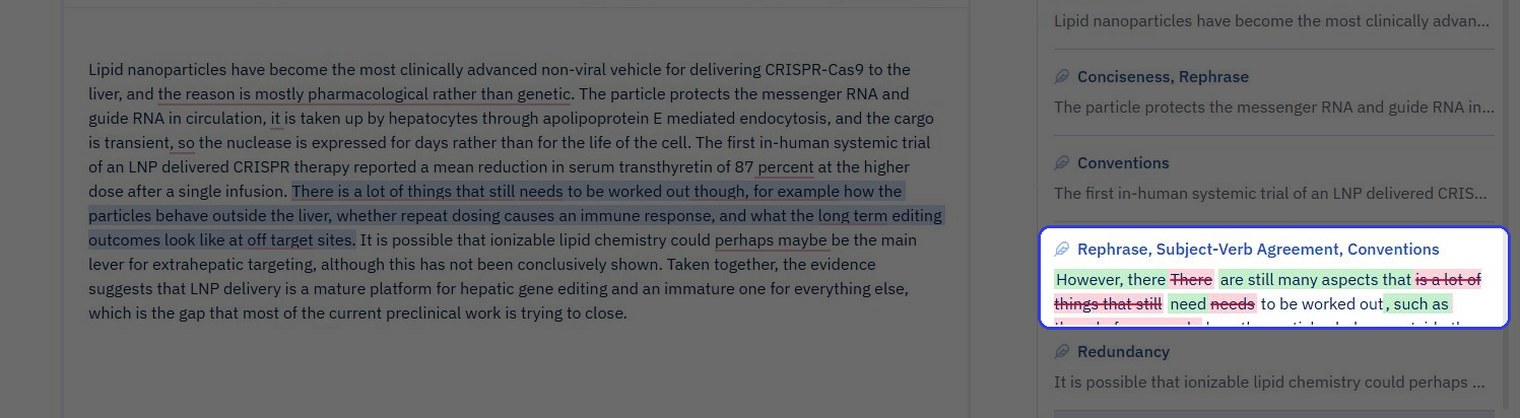
Pehli baar kholne par Paperpal: right side mein tagged suggestion list, jisme toote hue sentence ka rewrite card ke andar tracked changes ke roop mein dikhaya gaya hai.
Rewrite agreement error ko fix karta hai aur dono compound modifiers ko hyphenate karta hai. Yeh "there are still many aspects that need to be worked out" ko barkarar rakhta hai, jo ki original ke saman hi hai.
Winner - Jenni, us sentence par jise ek supervisor accept karega. "Much remains to be worked out" zyada tight fix hai, aur Jenni ne kuch bhi badalne se pehle apna reasoning dikhaya.
<ProTip title="⚠️ Caution:" description="A rewrite that keeps the shape of the original sentence keeps its problem. Read the suggested sentence aloud before accepting it, whichever tool proposed it" />
Citation
Jenni - Cite button, ya text mein @ type karne se, cursor par teen tabs ke sath ek search panel khulta hai: All, Discover aur Library. Title type karne par, Discover ne sabse pehle NEJM trial ko list kiya: 1.6K citations, ek impact factor of 24.39, ek Open Access badge, aur abstract se ek excerpt.
Ush card par Cite ne ek click mein do kaam kiye. In-text citation cursor par chala gaya, aur document ke foot par ek References section aa gaya: full APA 7th entry apne DOI ke sath, ek style dropdown aur ek Sources counter jo 1 read kar raha hai.

Jenni mein Cite ke baad ek click: in-text citation paragraph mein hai aur APA 7th reference, apne DOI ke sath, page ke foot par ek style dropdown ke sath hai.
Paperpal - do raaste. Cite Text, jo sentence ko highlight karke khola gaya, ne teen broad reviews diye, do 2025 se aur ek 2019 se, aur unme se koi bhi trial nahi tha.
Search Papers mein title type karne par isne ise pehli baar mein hi dhoond liya: Gillmore et al., NEJM, August 2021, 1,650 citations, top-quartile journal ke liye ek Q1 badge, open access, aur dusre number par usi title ka ek NEJM letter.
Insert Citation ne ek modal khola jisme full APA 7th entry dikhayi gayi, fir cursor par citation drop kiya aur page ke bottom par reference add kiya.

Paperpal Insert Citation: ek modal mein APA 7th entry, citation label, aur yeh note ki reference page ke bottom par jata hai.
Dono tools ne citation ko full stop ke baad rakha, jabki APA chahta hai ki yeh pehle ho. Kisi ne bhi ise move nahi kiya.
Winner - Jenni, is baat par ki reference ke andar aane ke baad uski kya value hai: ek References section jo dropdown se restyle hota hai aur Word mein live citation fields ke roop mein jata hai.
<ProTip title="📌 Remember:" description="When you know the paper, search its title or DOI rather than the sentence. Cite Text on a highlighted sentence returned three broad reviews; the title search returned the trial first time" />
Argument
Jenni - top bar par Review paanch list karta hai: Claim confidence, Peer Review, Source Quality, Tone of Voice aur Proofread. Claim confidence wahi hai jiski is paragraph ko zaroorat thi.
Yeh 21 seconds tak chala, isne raaste mein kiye gaye char database queries ko dikhaya, aur teen suggestions diye: do Unsupported, ek Weakly supported, aur Misrepresented, Contradicted, Overstated aur Unverifiable ke samne green ticks. Har suggestion ek sentence par pinned hai aur usme ek proposed source apne citation count aur impact factor ke sath hota hai.

Jenni mein paragraph ke andar inline baithe teen proposed citations, right side ke panel mein Claim confidence breakdown ke sath.
Dono kaise gaye:
Apolipoprotein E claim - Woitok et al., 2020, Cell Death and Disease, 49 citations, impact factor 8.02, ek hepatocyte-directed siRNA study. Accept kiya gaya, aur reference list badhkar do ho gayi.
"Most clinically advanced" line - colon disease ke liye mulberry-leaf lipid nanoparticles par Small mein ek 2024 paper, 29 citations. Ek real record, aur us sentence ke liye galat. Reject kiya gaya.
87 percent figure - usi study ke 2022 reprint ke liye NEJM citation ka ek proposed swap, 46 citations, impact factor 0.00. Same paper, worse record. Reject kiya gaya.
Har card par Accept aur Reject hai, sath hi Accept All, Reject All aur Y aur N keys hain, aur panel "All suggestions resolved" par close hota hai. Teen mein se do proposals ko refuse kiya gaya, ek-ek click mein, aur jo thik tha use file kiya gaya.
Paperpal - Checks tab mein Reference Checker, Journal Fit aur AI Review hote hain. AI Review, jo "Check the Scientific Soundness of the Document" ke roop mein chalaya gaya, numbered findings ke sath wapas aaya. Pehli finding ne kaha ki koi sentence yeh nahi batata ki yeh piece kya contribute karta hai. Dusri ne open-questions wale sentence ko quote kiya aur note kiya ki questions listed hain, par unhe kabhi bhi is kaam ke address kiye jaane wale gaps ke roop mein frame nahi kiya gaya.
Dono hi ek akele likhe gaye paragraph ke sahi readings hain. AI Review har problem ko describe karta hai aur prose mein ek fix suggest karta hai; yeh jaakar koi paper nahi dhoondta, aur panel is feature ko experimental label karta hai.
Winner - Jenni, ek weak claim ke liye source dhoondne ke criterion par. Claim confidence ne unke citation counts aur impact factors ke sath teen real records dhoonde, aur writer ne teen clicks mein ek ko rakha aur do ko refuse kiya. AI Review ne gaps ke naam bataye aur wahan ruk gaya.
<ProTip title="💡 Pro Tip:" description="Read the journal line on any source a review proposes. A reprint, a yearbook entry or a letter can carry the same title as the paper you actually mean" />
File
Jenni - three-dot menu mein Export hai, do formats ke sath: Word (.docx) aur LaTeX (.tex). Word dialog pehle upyogi sawal puchta hai: native Word citations, jo in-text cites aur bibliography ko References tab ke zariye linked rakhte hain, ya Google Docs ke liye hyperlink citations.
Fir ek layout preset: default, double-spaced manuscript 12pt Times New Roman par one-inch margins ke sath, two-column paper, ya title page aur contents ke sath thesis. LaTeX route .tex ke sath ek .bib file pack karta hai. Jenni PDF export nahi karta; Word use ek Save As mein kar deta hai.
Paperpal - pricing page docx aur pdf ke roop mein export list karta hai. Web editor un kai jagahon mein se ek hai jahan yeh chalta hai: ek Word add-in hai, Google Docs aur Overleaf ke liye ek Chrome extension hai, aur ek Edge version hai. Agar manuscript pehle se hi Word mein hai, to checker wahan aa jata hai.
Winner - is baat par depend karta hai ki file kahan hai. Jenni agar citations ko live fields ke roop mein Word mein aana hai, ya paper apni .bib file ke sath LaTeX ki taraf ja raha hai. Paperpal agar manuscript ko Word mein rehna hai ya tool se hi PDF ki zaroorat hai.
<ProTip title="🔗 Next step:" description="If the manuscript must stay in Word, install the Paperpal add-in rather than pasting into the web editor. The checks run on the file itself and nothing has to be exported back" />
Jenni kahan aage hai

Teen cheezein jo Jenni ne test mein keen par Paperpal ne nahi keen:
Document ke andar, ek click mein citation aur reference - in-text cite aur APA 7th entry apne DOI ke sath ek sath aaye, style dropdown ke sath ek References section mein. Paperpal citation insert karta hai aur reference ko page ke bottom par text ke roop mein rakhta hai.
Ek review jo sources dhoondta hai aur unhe file karta hai - teen claims flag kiye gaye, har ek ke liye uske citation count aur impact factor ke sath ek real paper propose kiya gaya, decision writer par chhoda gaya, aur accepted source ko list mein add kiya gaya. AI Review gap ko describe karta hai.
Export jo citations ko live rakhta hai - References tab ke zariye linked native citation fields ke sath Word, ya .bib file ke sath LaTeX, char layout presets ke sath jisme ek thesis layout bhi shamil hai.
Paperpal ke paas kya hai jo Jenni ke paas nahi hai
Teen cheezein, dono products ke khilaf check ki gayin, har ek ke sath jo Jenni iske badle karta hai:
Ek Word add-in, aur Google Docs aur Overleaf ke liye extensions - file kabhi move nahi hoti. Jenni design se ek workspace hai: .docx import karein, usme likhein, cite karein aur review karein, aur citation fields intact ke sath .docx export karein. Ek Jenni Word extension waitlist par hai.
Journal Fit - che areas mein 30-plus pre-submission checks: language, references, structure aur counts, figures aur tables, disclosures, metadata. Jenni ke paas koi journal-specific check nahi hai; iske paas paanch Reviews hain jo claims, sources, tone aur proofreading ko cover karte hain.
Tool se seedhe ek PDF - Jenni Word aur LaTeX bhejta hai, aur Word ek step mein PDF mein save kar deta hai.
Har tool ki kya cost hai
Ye figures har pricing page par standard prices hain, monthly price aur yearly total.
Plan | Jenni | Paperpal |
|---|---|---|
Free | $0. Unlimited citations, ek din mein 10 autocompletes, 3 AI edits, 5 AI chat messages, 3 reviews, 10 PDF uploads | $0. Ek mahine mein 200 grammar edits, ek din mein 5 research lookups, ek din mein 5 AI Review uses, ek mahine mein 5 PDFs ke sath chat, koi automated bibliography nahi |
Middle tier | Plus: $30 ek mahine ka, ya $144 ek saal ka | Prime: $25 ek mahine ka, ya $144 ek saal ka |
Top tier | Pro: $73 ek mahine ka, ya $348 ek saal ka | Pro: $59 ek mahine ka, ya $348 ek saal ka |
Top tier kya unlock karta hai | Unlimited autocomplete, chat, edits aur reviews, 1,000-page PDFs, full document export, priority support | Unlimited grammar aur consistency edits, full report ke sath Journal Fit, ek mahine mein 30k words ke reference checks, unlimited paraphrase aur research, ek mahine mein 500 PDFs ke sath chat, 10 GB library |
September 2026 ki pricing, jenni.ai/pricing aur paperpal.com/pricing se.
Yearly, dono barabar hain: dono sites par middle tier ke liye $144 aur top tier ke liye $348. Monthly, Jenni $30 aur $73 hai jabki Paperpal $25 aur $59 hai. Jenni ke tiers writing volume khareedte hain: autocompletes, edits, reviews, PDF size, export. Paperpal ke tiers checking volume khareedte hain: edits, reference checks, journal fit reports.
<ProTip title="⏳ Timing:" description="Run Journal Fit last, after the references are final. It runs 30-plus submission checks on the manuscript, references included, so anything you change afterwards has to be checked again" />
Aapko kaunsa use karna chahiye?
Agar abhi likhna baki hai, to Jenni. Paperpal manuscript khatam hone ke baad Word ke andar chalane ke liye sahi pass hai.
Agar table par option checker ke bajaye chat assistant hai, to wahi paragraph Jenni vs ChatGPT aur Jenni vs Claude se guzar chuka hai. Yahan teen readers hain, har ek ki apni pasand.
PhD student, paanch mein se teesra chapter
Jenni - teen cheezein jo aap thesis likhte waqt sabse zyada karte hain, sab document ke andar hoti hain: cursor par citation search, reference list jo apne aap banti hai, aur har chapter mein ek baar chalne wala Claim confidence. Agar papers ek Zotero ya Mendeley library mein hain, to woh import ho jate hain.
Agar destination ek journal hai, to finished manuscript par Paperpal Journal Fit chalayein.
Ek postdoc jiska manuscript journal mein submit hone wala hai
Manuscript ke liye Jenni, journal check ke liye Paperpal - native citation fields ke sath Word export aur double-spaced preset submission ke kaam hain. Agar koi reviewer paragraph ke baare mein pooch sakta hai ki aisa kisne kaha, to pehle ise Claim confidence se guzarein. Fir final file par, Word ke andar, Journal Fit chalayein.
Masters student jiska supervisor poochta hai "kisne kaha?"
Jenni - ek dissertation kisi bhi aur cheez se pehle ek citation workload hai, aur har Cite click ke sath apne aap banne wali reference list wahi feature hai jo fayda deti hai. Claim confidence, jo har chapter mein ek baar chalaya jata hai, supervisor ke poochne se pehle hi jawab de deta hai.
Agar dissertation likha ja chuka hai aur sirf grammar pass ki zaroorat hai, to Paperpal par alag se ek lamba look hai.
<CTA title="Start the next chapter with its sources attached" description="Search, cite and review inside one editor, then export to Word with the citations still linked" buttonLabel="Start Writing Free" link="https://app.jenni.ai/register" />
Paperpal ne pehli baar kholne par zyada issues flag kiye, aur isme journal fit check aur Word add-in hai. Ek manuscript jo pehle se likha hua hai aur Word mein hai, uske liye yeh sahi pass hai.
Jo paragraph Jenni se guzra woh cited hokar nikla. Trial ek click mein andar chala gaya, reference list apne aap likh gayi, Claim confidence ne do aur claims par papers dhoonde aur jo thik tha use file kiya, aur export dialog har ek citation ke live hone ke sath file ko Word mein bhejne ke liye taiyar tha.
Jenni mein paper likhein. Agar journal chahta hai ki file wahan check ho, to Word ke andar Paperpal chalayein. Har source ka DOI sambhal kar rakhein.