Dwara
Justin Wong
—
Elicit AI Review: Kya Yeh Ek PhD Thesis Ke Liye Sahi Papers Dhundta Hai?

Justin Wong
Vikas Prabhari
Graduated kiya Bachelor's me Global Business & Digital Arts, Minor me Entrepreneurship
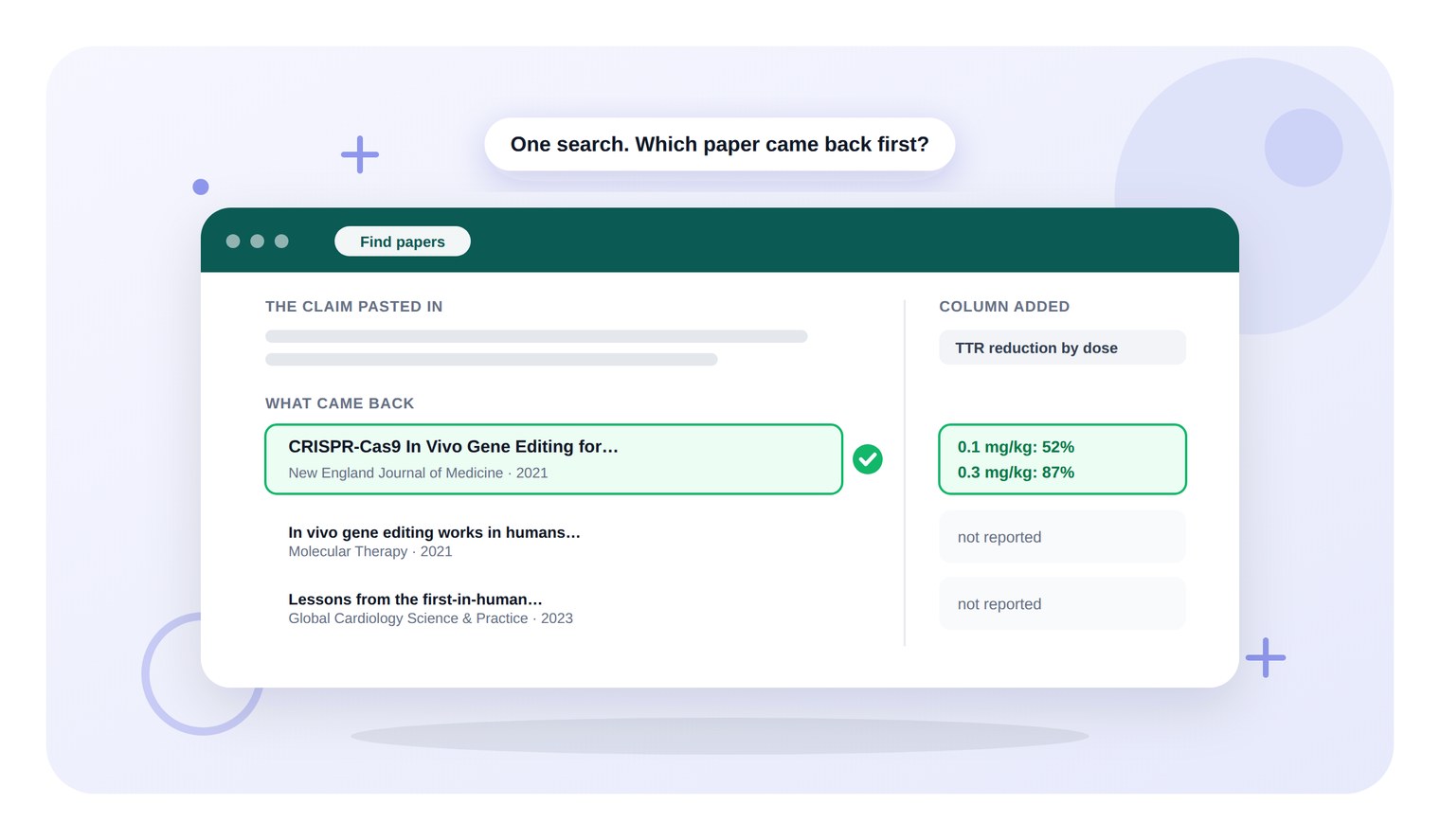
Elicit ko ek draft se ek sentence diya gaya tha, yeh claim karte hue ki ek CRISPR trial ne serum transthyretin ko 87% tak kam kiya, aur iske peeche ke papers ko dhundhne ke liye kaha gaya. Sabse pehle 2021 ki NEJM report aayi, aur 2022 ki reprint jiska title same tha, woh kabhi nahi dikhi.
Us table mein add kiye gaye ek column mein har dose par reduction ke baare mein pucha gaya tha. Elicit ne 0.1 mg per kilogram group ke liye 52% aur 0.3 ke liye 87% return kiya, aur guess karne ke bajaye 'not reported' likha, jahan paper mein khud ka koi dose figure nahi tha.
<CTA title="Keep every paper you find in one library" description="Search your own papers by meaning or by keyword, across titles, authors, abstracts and the full PDF text" buttonLabel="Try Jenni Free" link="https://app.jenni.ai/register" />
TLDR
Elicit | |
Verdict | Papers dhundhne aur unme se figures nikalne mein strong hai |
Best for | Ek research question ko ek literature table mein badalne ke liye |
Weak spot | 13 report sources mein se 5 sirf abstract-only the |
Price | Academic Plus $19 ek mahine ka, ya $132 ek saal ka |
What was tested | Ek CRISPR test paragraph par teen Elicit modes |
Pair it with | Jenni, document mein draft karne aur cite karne ke liye |
What Elicit is
Elicit ek research agent hai jo paper index par kaam karta hai, aur iska home page us index ko 138 million se zyada academic papers aur 545,000 clinical trials par batata hai.
Prompt box mein ek mode button hai jis par Research agent likha hai, aur uske neeche paanch chips hain jo set karti hain ki agent kya produce karega:
Find papers - sources ka ek sortable table return karta hai jismein har ek ke liye ek Summary aur ek Relevance column hota hai.
Draft report - ek cited report likhta hai aur un sources ko dikhata hai jinka usne use kiya.
Build deck - slide mode, jise is test mein run nahi kiya gaya.
Strategy and Landscapes - do aur modes, jinhe yahan test nahi kiya gaya.
Left rail mein New, Search, Recents aur Library hain, isliye sessions aur saved papers ek hi account mein rehte hain na ki kisi document mein.
Who Elicit is for
Elicit writing stage ke bajaye reading stage se belong karta hai. Yeh thesis ke us point par fit baithta hai jahan question set ho chuka hai aur uske peeche ke papers abhi nahi mile hain.
Yeh un sabhi ke liye bhi suitable hai jise ek set ke har paper se same figure nikalne ki zaroorat hoti hai, kyunki iske table columns yahi kaam karte hain. Yeh koi editor nahi hai, aur draft ko abhi bhi kisi aur jagah likhna hoga.
Ek aise researcher ke liye jiska manuscript pehle se drafted hai, iska use limited hai. Elicit aapko batayega ki field aapke claim ke baare mein kya kehti hai, lekin yeh us sentence ko mark nahi karega jo ise banata hai.
The test, run by run
In reviews mein use kiye gaye CRISPR paragraph ke do sentences ko ek hi session mein teen Elicit modes ke through pass kiya gaya.
The claim - ek infusion ke baad high dose par serum transthyretin mean 87% kam hua (Gillmore et al., NEJM 2021).
The trap - ek 2022 reprint ka title wahi hai jo us paper ka hai, isliye search karne par galat paper return ho sakta hai.
The figures to protect - PubMed abstract 0.1 mg per kilogram par 52% aur 0.3 par 87% deta hai.
How it was logged - yahan har ek count aur quoted line page se li gayi thi, aur har ek timing clock ke check se match ki gayi thi.
Find papers: one claim in, four papers out
The run - claim ko ek single sentence ke roop mein dala gaya jabki Find papers chip selected thi. Click karne ke lagbhag 50 seconds baad rows dikhne lagin, aur 80 seconds ke check par table complete ho gayi.
Iska result "Papers on first-in-human systemic LNP-CRISPR therapy for transthyretin" heading ke tehat ek char-row wali table thi, jismein Source, Summary aur Relevance columns the.
Row ek 2021 NEJM paper tha, jise Full text available mark kiya gaya tha, aur Relevance cell mein likha tha "Direct primary evidence for the trial and the 87% figure in the prompt." 2022 ki reprint table mein nahi thi.
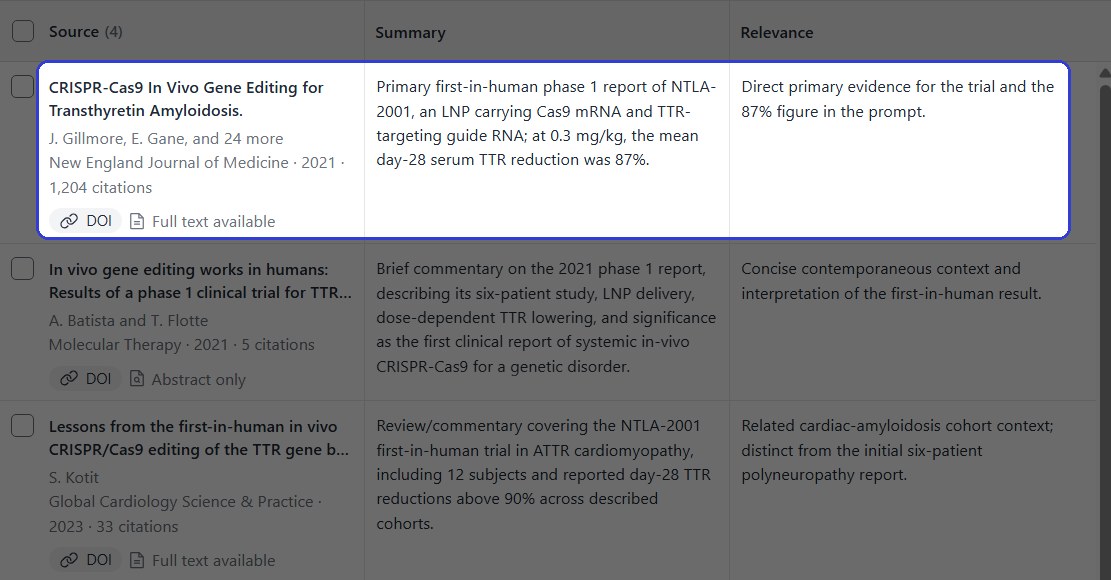
Find papers table, jismein pehli row mein 2021 NEJM report hai aur uske sath iski relevance note hai.
Baki teen rows ek 2021 commentary, ek cardiomyopathy cohort ki 2023 review aur ek 2018 preclinical study thin. Har row mein journal, year, citation count, DOI chip aur ek full-text badge tha.
Table ke sath hi, Elicit ne prose mein likha ki usne kya dhundha hai, trial ka naam, che participants, dose aur measurement lene ka din bataya, jismein sentence ke sath citation attached tha.
Us answer ke neeche ek Methods note kehta hai ki results ko ek source-linked collection mein curate kiya gaya tha, jismein primary study ko priority di gayi aur adjacent interpretation ko add kiya gaya. Yeh ek choti line hai is baare mein ki char rows ko kaise chuna gaya.
Answer ke neeche teen follow-up questions offer kiye gaye the, jismein ek aisa question tha jo 12-month ke results ko dhundhega aur ek jo collection ko bibliography ke roop mein export karega.
<ProTip title="🔎 One claim per search:" description="Paste the single sentence you need to support rather than the whole paragraph. The narrower the claim, the more exactly the top row matches it" />
Add a column: the doses it got right
The run - Add a column button ek panel kholta hai jismein ek Name field aur ek Instructions field hoti hai. Column ka naam TTR reduction by dose rakha gaya, aur instructions mein har dose par mean reduction pucha gaya, aur jahan paper mein koi figure na ho wahan 'not reported' likhne ko kaha gaya.
Column 40 seconds se kam mein fill ho gaya. NEJM paper ke samne likha tha "0.1 mg/kg: 52%; 0.3 mg/kg: 87%.", jo dono doses par abstract se match karta hai.
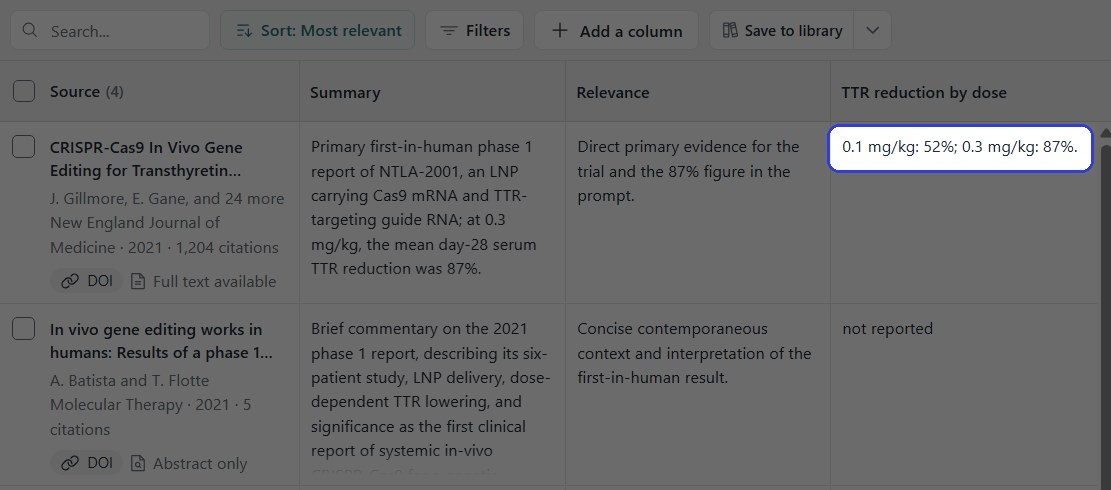
Add kiya gaya column, jismein trial paper se dono dose figures extract kiye gaye hain.
Commentary aur preclinical study dono 'not reported' ke roop mein return huye, jo ki instruction ko follow karna hai na ki guess ke sath gap ko fill karna.
<ProTip title="🧪 Name the unit in the column:" description="Write the unit and an example into the instructions field, such as a dose in mg per kg. Columns asked in plain words come back in mixed formats" />
Draft report: where it argued back
The run - Draft report chip ne same paragraph se hedge liya, jo assert karta hai ki ionizable lipid chemistry liver ke bahar target karne ke liye main lever hai. Report click ke lagbhag do minutes baad aayi.
Iske progress lines scale ke baare mein specific hain. Elicit ne 56 screened sources ke cross evidence ko compare karne, fir 10 studies ke cross delivery proxies ke against direct results ko compare karne ki report di.
Report ne question ke pehle half ka answer 'yes' diya, fir second half ko decline kar diya. Report kehti hai ki evidence lipid chemistry ko universal ya sole lever kehne ka support nahi karta, aur un dusre variables ke naam batata hai jo result ko change karte hain.
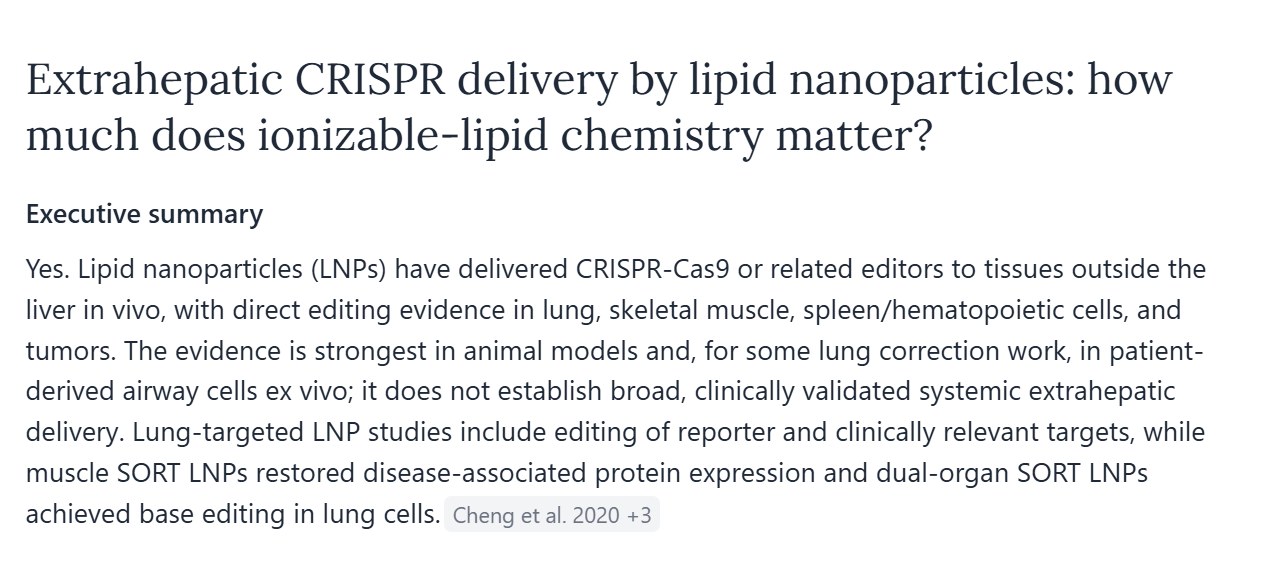
Generated report ki opening, jismein summary ko close karne ke liye ek citation chip hai.
Yeh un teen cheezon ko bhi separate karta hai jinhe ek careless reader merge kar dega, jo hain particles ka organ tak pahunchna, delivery ke baad expression, aur intended cells mein editing. Jahan cited result weaker category ka tha, report ne aisa likha.
Report ke har claim mein ek inline citation chip hoti hai jismein author aur year ka naam hota hai, aur ek chip jo kayi sources ko cover karti hai, naam ke baad ek count print karti hai. Report ke neeche koi numbered reference list nahi hai.
Last section ka heading Overall assessment and remaining gap hai, aur yeh restatement ke bajaye is baat par close hota hai ki evidence abhi kya settle nahi kar sakta.
<ProTip title="🧭 Give it the claim you doubt:" description="Put your own hedge into the prompt and see whether the report defends it. A tool that pushes back is doing the job a supervisor would" />
Where Elicit asks for a second look

Report panel mein ek Sources view hota hai, aur wahi view hai jahan iski limits dikhti hain. Isne lagbhag 9,400 characters ki report ke liye 13 sources list kiye.
Un 13 mein se, 8 ko Full text available mark kiya gaya tha aur 5 ko Abstract only mark kiya gaya kya tha. Isliye report ke peeche ke 5 sources ko sirf abstract level par padha gaya tha.
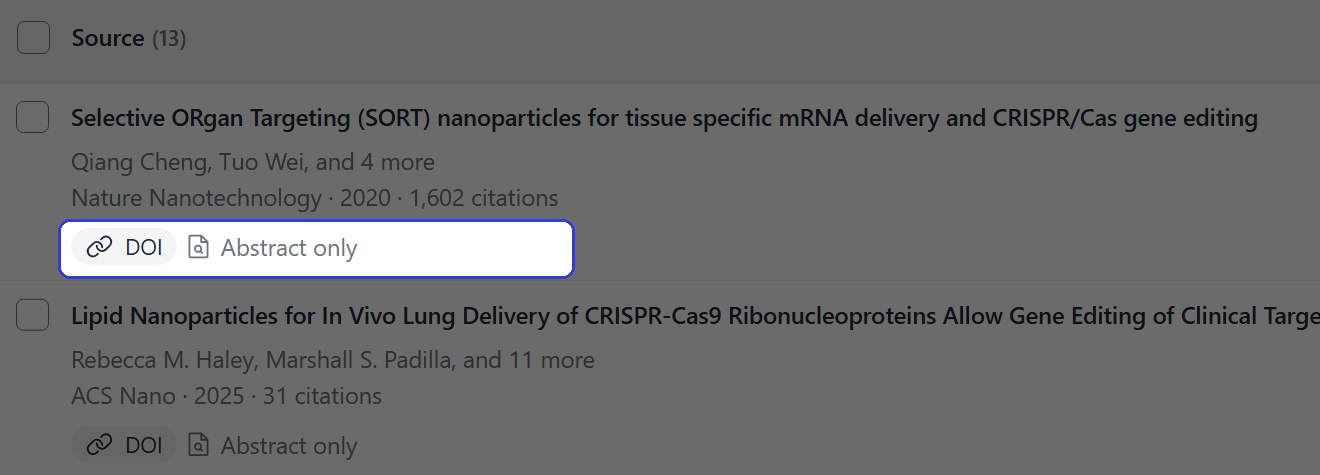
Sources view, jismein pehle source par badge dikha raha hai ki ise abstract level par padha gaya tha.
Menu item jo view kholta hai, uske sath source count print karta hai, isliye 13 bina kuch khole hi visible hai. Full text aur abstract ke beech ka split visible nahi hai, aur uske liye count karna padta hai.
Isme se kuch bhi report ko unusable nahi banata. Iska matlab hai ki report ke kisi sentence ko chapter ka sentence banane se pehle badge ko check karna worth hai.
Relevance column paper table mein similar kaam karta hai. 2023 review par yeh likhta hai "Related cardiac-amyloidosis cohort context; distinct from the initial six-patient polyneuropathy report.", jo Elicit dwara ek row ko equivalent ke bajaye adjacent mark karna hai.
<ProTip title="📄 Check the badge, then the DOI:" description="Open the sources view and look for the abstract-only label. Anything you plan to quote should be read in full, from the DOI rather than the summary" />
What Elicit costs
Elicit apne pricing page par do price sets list karta hai, ek academic users ke liye aur ek industry ke liye, jismein har ek ke liye monthly aur yearly figures hain.
Plan | Academic | Industry |
Basic | $0. Unlimited search aur summaries, limited agent aur report usage | $0. Same free entry tier |
Plus | $19 ek mahine ka, ya $132 ek saal ka | Offer nahi kiya gaya |
Pro | $69 ek mahine ka, ya $468 ek saal ka | $75 ek mahine ka, ya $588 ek saal ka |
Scale | $149 ek mahine ka, ya $1,068 ek saal ka | $279 ek mahine ka, ya $2,028 ek saal ka |
Enterprise | Custom | Custom |
October 2026 pricing, 2 October ko elicit.com/pricing se padha gaya.
Academic Plus tier woh hai jo thesis ke liye matter karta hai, kyunki Elicit wahan RIS, CSV, BIB, PDF aur DOCX export list karta hai, sath hi ek baar mein paanch table columns aur 500 thousand se zyada clinical trials mein search provide karta hai.
Basic unlimited search, unlimited summaries aur papers ke sath chat ko cover karta hai, jismein agent aur report usage ko limited describe kiya gaya hai. Pro systematic review workflow ko add karta hai jo ek baar mein 20 columns, custom extractions aur API access ke sath 5,000 papers ko screen karta hai.
Routines ka access bhi ek Pro line hai. Elicit unhe agent dwara naye evidence dhundhne, aapke kaam ko update karne aur report back karne ke roop mein describe karta hai, jo ki ek review ke liye feature hai jise current rehna hai. Figures se extract karna isse bhi ek tier upar hai, Scale par.
Elicit against the alternatives
Jenni - difference yeh hai ki kaam kahan lands hota hai. Elicit apne workspace mein ek table banata hai, jabki Jenni source ko us document mein dalta hai jise likha ja raha hai.
Same paragraph par, Claim confidence ne lagbhag 47 seconds mein 4 suggestions return kiye, har ek inline card proposed source, iska citation count aur iska impact factor batata hai, jismein quoted passage attached tha aur accept ya reject ka option tha.
Jenni ek Library bhi rakhta hai jo titles, authors, abstracts aur full PDF text search karti hai, aur citations ke enter hote hi draft ke neeche reference list banati hai.
Consensus - yeh published studies se research question ka answer deta hai bajaye ek table return karne ke, aur Consensus review cover karta hai ki iske answers kitne worth hain. Same paragraph tool reviews mein kayi dusre tools ke through pass ho chuka hai.
Should a PhD student pay for Elicit?
Reading stage ke liye, haan. Isne title ke bajaye claim se sahi paper dhundha, isne do dose figures ko sahi tareeqe se nikala, aur isne us hedge ko endorse karne se mana kar diya jise draft ne overstate kiya tha.
Kisi bhi cheez ka DOI apne paas rakhein jise quote kiya jayega, aur report ke sentence ko chapter ka sentence banane se pehle abstract-only badge ko check karein.
<CTA title="Watch the reference list write itself" description="Cite while you draft and the reference list assembles underneath, in APA, MLA, Chicago, IEEE or Harvard" buttonLabel="Start Writing Free" link="https://app.jenni.ai/register" />
In chapters ke liye khud, thesis ko draft karein Jenni mein, jo writing aur sources ko same file mein rakhta hai. Elicit ko chapter ke start mein layein, jabki reading abhi bhi chal rahi ho.