Akademik Değerlendirme

Marc
·
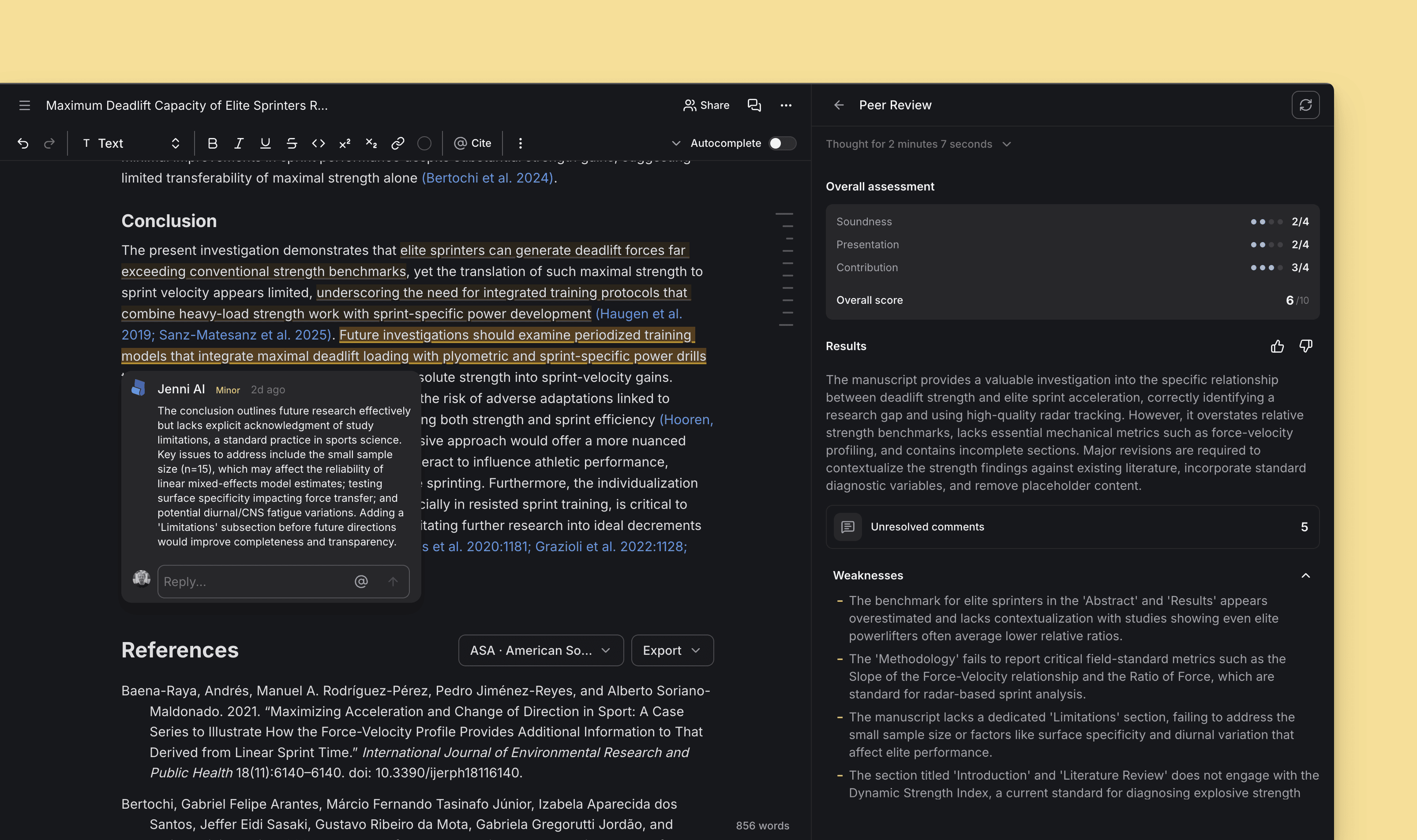
Hakem değerlendirmesi simülasyonu ile çalışmanızı teslim etmeden önce doğrudan metin üzerinde nokta atışı geri bildirimler alın, makalenizi kusursuzlaştırın.
Yeni Eklenenler
Peer Review (Akran Değerlendirmesi) özelliği yayında! Peer Review, belgeniz için size genel bir puan ve geri bildirim sunar; taslağınızda geliştirilmesi gereken kısımlar için doğrudan editör üzerinde yorumlar bırakır. İncelemeler panelini açın ve hemen deneyin!
Yapay Zeka Sohbeti (AI Chat) artık her yanıtın altında kaynaklarını listeliyor. Üstelik varsayılan APA7 dışındaki formatları görmek isterseniz bir atıf stili seçicisi de sizi bekliyor.
Otomatik Tamamlama (Autocomplete) özelliğinde, önerileri tam istediğiniz yöne yönlendirmeniz için mükemmel bir seçenek olan yeni
Düşünme adımıyla yönlendirseçeneği eklendi.Yorumlar sekmesindeki yorumları sıralama ve filtreleme özelliği getirildi.
İçe aktarılan
.docxbaşlıkları artık otomatik olarak satır içi içindekiler tablosunda görünüyor.Editörde H4 başlık desteği sağlandı.
Otomatik Tamamlama ayarlarında ve İddia Güvenilirliği İncelemesinde (Claim Confidence Review), atıfta bulunulan makaleleri atıf sayısına göre filtreleme özelliği eklendi.
Geliştirmeler
Peer Review panelinden doğrudan Yorumlar listesine geçiş yapabilirsiniz. Ayrıca editör içindeki bireysel akran değerlendirmesi yorumlarını bulmak artık çok daha kolay.
Yapay Zeka Sohbeti (AI Chat), bir koleksiyon hakkındaki soruları yanıtlarken artık koleksiyonun tüm meta verilerini kullanarak içerikte ne olduğunu eksiksiz biliyor.
Atla ve yazmaya başlaseçeneğine tıklandığında, bir belge komutu (prompt) olduğu sürece başlık ve alt başlıklar otomatik olarak oluşturulmaya devam eder.Yorumlar artık dışa aktarma, kopyalama veya
.docxdosyalarını yapıştırma işlemlerinde korunuyor (yorumları Word veya Google Dokümanlar'da dışa aktarıp okumak isterseniz yeni Peer Review özelliğiyle harika çalışır).Uygulama genelindeki filtre menüleri artık tutarlı ve şık bir tasarıma sahip.
Tablolar artık editörde görsel bir girinti göstermiyor.
Sohbeti aşağı kaydırma butonunun belirginliği azaltıldı, böylece görünür olduğunda sohbet mesajlarını engellemeyecek şekilde tasarlandı.
Belge oluşturma tarihine, daha kolay taranabilmesi için artık yıl bilgisi de dahil edildi.
PDF görüntüleyicide okumayı zorlaştıran otomatik bağlantı oluşturma davranışı devre dışı bırakıldı.
Düzeltilenler
IEEE atıflarında
chapter(bölüm) alanının hatalı görünmesi düzeltildi.APA 7 Almanca atıflarda, sayfa referansları için artık
p.yerine düzgün bir şekildeS.kullanılıyor..docxdışa aktarımında, seçenek etkinleştirildiğinde artık sayfa numaraları da dahil ediliyor.Bölüm atıfları için artık sayfa numaraları girilebiliyor.
Hataları azaltmak için PDF yükleme akışı daha kararlı hale getirildi.
Kaynak listesi artık yalnızca ilk sayfayı değil, tüm sayfa aralığını gösteriyor.
İki haneli sayfa numaralarında artık aralık okları görünmüyor.
Metin içi atıf penceresinde Düzenle seçeneğine tıklandıktan sonra oluşan çerçeve sorunu giderildi.
Yapay zeka imlecinin "düşünme" adımında takılı kalması sorunu düzeltildi.
Kurulumu atlayıp doğrudan yazmaya başlarken yaşanan başlık oluşturma sorunu giderildi.
Yan menünün, belgenin üstündeki sabit araç çubuğunun arkasında kalması sorunu düzeltildi.
Ekleme davranışı artık başlık bloğunda tutarlı çalışıyor ve belge başlığı alanını bozmuyor.